本文档基于 Claude Code CLI 工具的源码进行深度分析,旨在用清晰易懂但专业的语言,详细讲解其内部运行机制。特别关注 Memory(记忆)模块的设计与实现。
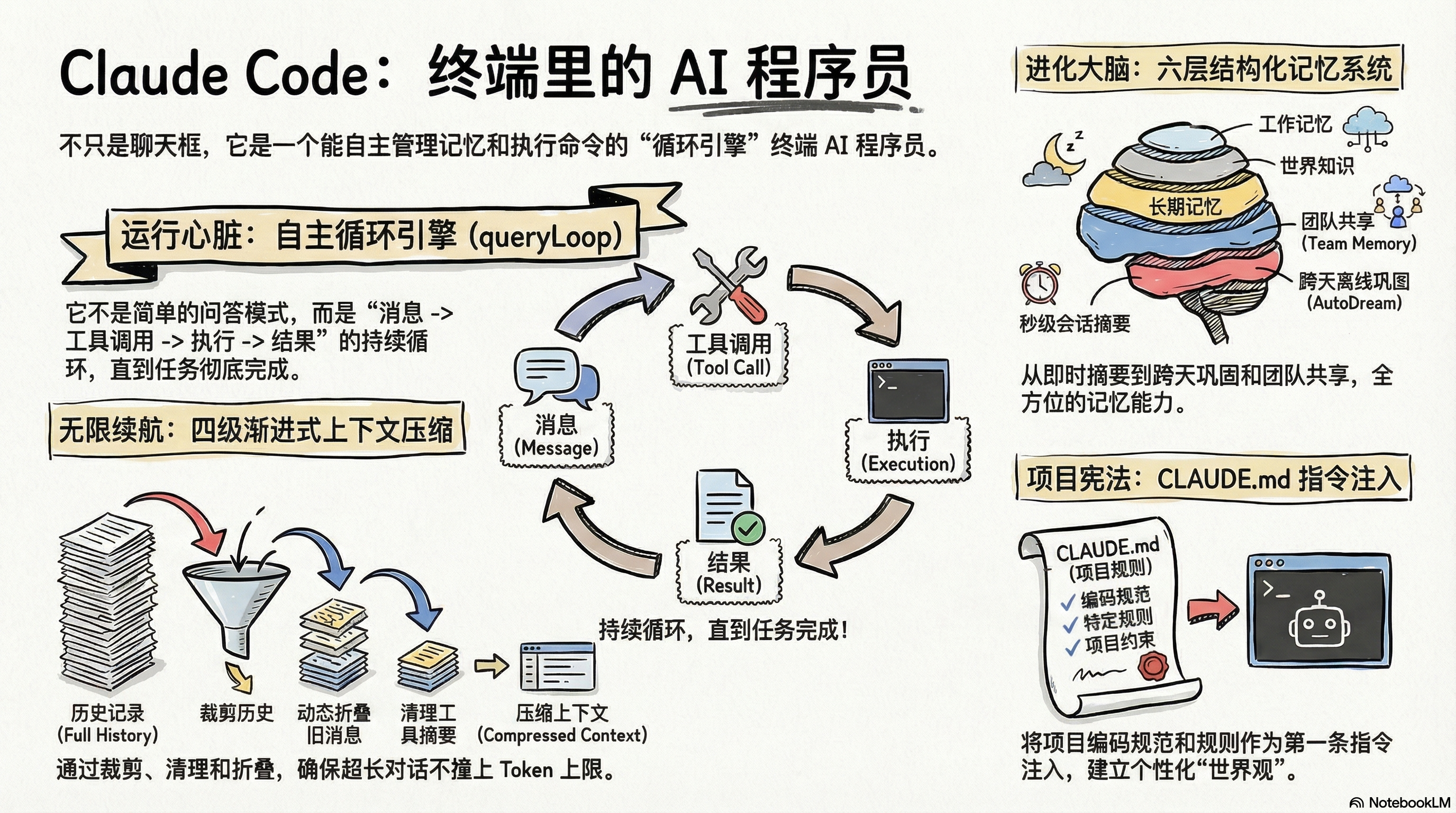
1. 项目总览:Claude Code 是什么
Claude Code 是 Anthropic 官方开发的命令行 AI 编程助手(CLI)。你可以把它想象成一个"住在终端里的 AI 程序员"——它能读文件、写代码、运行命令、搜索代码库,甚至能记住你的偏好。
技术栈
| 组件 | 技术 |
|---|---|
| 运行时 | Bun (不是 Node.js) |
| 语言 | TypeScript / TSX |
| CLI 框架 | Commander.js |
| 终端 UI | React + 自定义 Ink 框架 |
| API 通信 | Anthropic Claude API |
| 状态管理 | Zustand |
入口文件
src/main.tsx          ← 主入口,初始化一切
src/entrypoints/cli.tsx ← CLI 命令注册
src/replLauncher.tsx  ← 交互式 REPL 启动
2. 整体架构:代码是怎么组织的
src/
├── main.tsx                    # 主入口:初始化、加载配置、启动 REPL
├── QueryEngine.ts              # 查询引擎:管理多轮对话状态
├── query.ts                    # 核心查询循环(最重要的文件之一)
├── Tool.ts                     # 工具接口定义
├── tools.ts                    # 工具注册聚合
├── context.ts                  # 上下文构建(CLAUDE.md、git 状态等)
├── commands/                   # 87+ 个斜杠命令 (/memory, /compact, /clear 等)
├── tools/                      # 43+ 个工具实现
│   ├── BashTool/               # 执行 shell 命令
│   ├── FileReadTool/           # 读文件
│   ├── FileWriteTool/          # 写文件
│   ├── FileEditTool/           # 编辑文件
│   ├── GrepTool/               # 搜索文件内容
│   ├── GlobTool/               # 搜索文件名
│   ├── AgentTool/              # 启动子 Agent
│   ├── WebSearchTool/          # 网络搜索
│   └── ...
├── services/                   # 业务逻辑服务
│   ├── SessionMemory/          # 会话记忆(Compact 时用的摘要)
│   ├── extractMemories/        # 自动记忆提取(跨会话持久化)
│   ├── compact/                # 上下文压缩
│   └── api/                    # API 通信
├── memdir/                     # Memory 目录系统(核心!)
├── constants/                  # 常量和 Prompt 模板
│   └── prompts.ts              # System Prompt 构建(非常重要)
├── utils/                      # 工具函数
│   ├── hooks/                  # Hooks 系统
│   ├── settings/               # 设置管理
│   ├── memory/                 # 记忆工具类型
│   └── claudemd.ts             # CLAUDE.md 加载
├── components/                 # React UI 组件
├── state/                      # 状态管理 (Zustand)
└── query/                      # 查询辅助逻辑
    └── stopHooks.ts            # 查询结束后触发的钩子
关键理解:Claude Code 不是一个简单的"发消息-收回复"程序。它是一个循环执行引擎:发消息给模型 → 模型返回工具调用 → 执行工具 → 把结果发回模型 → 重复,直到模型不再调用工具。
3. 核心运行流程:从用户输入到模型输出
3.1 生命周期概览
用户输入 "帮我修复 bug"
        │
        ▼
┌──────────────────────┐
│  REPL 接收输入        │  ← replLauncher.tsx
│  构建 User Message   │
└──────────┬───────────┘
           │
           ▼
┌──────────────────────┐
│  QueryEngine          │  ← QueryEngine.ts
│  .submitMessage()     │  一个 QueryEngine 实例对应一个对话
│  管理多轮状态          │  mutableMessages 跨 turn 持久化
└──────────┬───────────┘
           │
           ▼
┌──────────────────────────────────────────┐
│  queryLoop() 核心循环                     │  ← query.ts (最重要的函数)
│                                          │
│  while (true) {                          │
│    1. 准备消息(压缩、裁剪、折叠)         │
│    2. 组装 System Prompt                 │
│    3. 检查是否需要 Auto-Compact          │
│    4. 调用 Claude API(流式)             │
│    5. 收集 Assistant 消息和工具调用        │
│    6. 执行工具(可并发)                  │
│    7. 收集工具结果                        │
│    8. 检查是否需要继续(有工具调用?)      │
│    9. 执行 Stop Hooks(含记忆提取)       │
│    10. 若无工具调用 → 退出循环返回用户     │
│  }                                       │
└──────────────────────────────────────────┘
3.2 QueryEngine:对话状态管理器
// 源码位置: src/QueryEngine.ts (line 184+)
class QueryEngine {
  // 跨 turn 持久化的状态
  mutableMessages: Message[]        // 完整对话历史
  abortController: AbortController  // 中断控制
  totalUsage: TokenUsage           // 累计 token 消耗
  readFileState: LRUCache          // 文件读取缓存

  // 核心方法:提交一条新消息,开始一个新 turn
  async *submitMessage(userMessage: Message): AsyncGenerator<StreamEvent> {
    // 1. 获取 System Prompt 各部分
    const { defaultSystemPrompt, userContext, systemContext } =
      await this.fetchSystemPromptParts()

    // 2. 组装最终 System Prompt
    const systemPrompt = [
      ...(customSystemPrompt || defaultSystemPrompt),
      ...(memoryMechanicsPrompt || []),
      ...(appendSystemPrompt || [])
    ]

    // 3. 进入查询循环
    yield* queryLoop(this.mutableMessages, systemPrompt, ...)
  }
}
通俗解释:QueryEngine 就像一个"对话管家"。你每说一句话,它都会记住之前的所有对话,准备好"世界观"(System Prompt),然后送去给 Claude 处理。
3.3 queryLoop():最核心的循环
这是整个 Claude Code 的"心脏"。位于 src/query.ts。
// 简化后的核心逻辑
async function* queryLoop(messages, systemPrompt, tools, ...) {
  let state = {
    messages,
    turnCount: 0,
    autoCompactTracking: undefined,
    // ... 其他状态
  }

  while (true) {
    state.turnCount++

    // ========== 阶段1:消息准备 ==========
    // 1a. 裁剪历史(snip compact)
    let messagesForQuery = applySnipCompaction(state.messages)

    // 1b. 微压缩(microcompact)—— 压缩工具结果
    messagesForQuery = applyMicrocompact(messagesForQuery)

    // 1c. 上下文折叠(context collapse)
    messagesForQuery = applyContextCollapse(messagesForQuery)

    // ========== 阶段2:System Prompt 组装 ==========
    const fullSystemPrompt = appendSystemContext(systemPrompt, systemContext)

    // ========== 阶段3:自动压缩检查 ==========
    if (await shouldAutoCompact(messagesForQuery, model)) {
      const result = await autoCompactIfNeeded(messagesForQuery, ...)
      if (result.wasCompacted) {
        // 用压缩后的消息替换,继续下一轮
        state.messages = result.compactionResult.summaryMessages
        continue
      }
    }

    // ========== 阶段4:调用 Claude API(流式) ==========
    const stream = callModel({
      messages: messagesForQuery,
      system: fullSystemPrompt,
      tools: toolDefinitions,
      // ...
    })

    let assistantMessages = []
    let toolUseBlocks = []

    for await (const chunk of stream) {
      // 收集 assistant 消息(文本 + 思考 + 工具调用)
      if (chunk.type === 'assistant') {
        assistantMessages.push(chunk)
        // 提取其中的 tool_use blocks
        for (const block of chunk.content) {
          if (block.type === 'tool_use') {
            toolUseBlocks.push(block)
          }
        }
      }
      yield chunk  // 流式输出给前端
    }

    // ========== 阶段5:执行工具 ==========
    let toolResults = []
    if (toolUseBlocks.length > 0) {
      // 工具编排:并发安全的工具一起跑,不安全的排队跑
      for await (const result of runTools(toolUseBlocks, toolUseContext)) {
        toolResults.push(result)
        yield result
      }
    }

    // ========== 阶段6:决定是否继续 ==========
    const needsFollowUp = toolUseBlocks.length > 0

    if (!needsFollowUp) {
      // 没有工具调用了 → 模型给出了最终回答

      // ========== 阶段7:执行 Stop Hooks ==========
      // 这里会触发记忆提取!
      await handleStopHooks(messagesForQuery, assistantMessages, ...)

      return { reason: 'completed' }
    }

    // 有工具调用 → 把结果追加到消息中,继续循环
    state.messages = [...messagesForQuery, ...assistantMessages, ...toolResults]
  }
}
3.4 工具执行管道
模型返回: [tool_use: Bash("ls"), tool_use: Read("main.ts")]
                    │
                    ▼
        ┌─────────────────────┐
        │  工具编排器            │  ← toolOrchestration.ts
        │  分组:并发 vs 串行    │
        └─────────┬───────────┘
                  │
    ┌─────────────┴──────────────┐
    │                            │
    ▼                            ▼
┌────────────┐            ┌────────────┐
│ Bash("ls") │ 并发执行    │ Read(...)  │
└─────┬──────┘            └─────┬──────┘
      │                         │
      ▼                         ▼
  检查权限                  检查权限
  (PreToolUse Hook)        (PreToolUse Hook)
      │                         │
      ▼                         ▼
  执行工具                  执行工具
      │                         │
      ▼                         ▼
  (PostToolUse Hook)       (PostToolUse Hook)
      │                         │
      └─────────┬───────────────┘
                │
                ▼
        收集为 tool_result 消息
        追加到对话历史
并发策略:
- 只读工具(Read、Grep、Glob)→ 最多 10 个并发
- 写工具(Write、Edit、Bash)→ 串行执行
3.5 自定义 Agent:定义、发现与调用
Claude Code 的 Agent 系统让模型能够委派子任务给专门的子代理。Agent 本质上是一个普通工具(工具名 Agent),由模型根据对话需要自主决定何时调用。
3.5.1 Agent 的三种来源
┌─────────────────────────────────────────────────────────┐
│  1. 内置 Agent(built-in)                                │
│     - general-purpose  通用多步任务 agent                 │
│     - Explore          快速代码库探索(只读)             │
│     - Plan             架构设计与实现规划(只读)         │
│     - claude-code-guide  Claude Code 使用指南             │
│     - statusline-setup   状态栏设置                      │
│     源码: src/tools/AgentTool/builtInAgents.ts            │
├─────────────────────────────────────────────────────────┤
│  2. 自定义 Agent(custom)                                │
│     - Markdown 格式: .claude/agents/*.md                  │
│     - JSON 格式: settings.json 的 agents 字段             │
│     - Plugin Agent: 插件系统注入                          │
│     源码: src/tools/AgentTool/loadAgentsDir.ts            │
├─────────────────────────────────────────────────────────┤
│  3. 优先级(同名覆盖)                                    │
│     built-in < plugin < userSettings < projectSettings   │
│     < flagSettings < policySettings                      │
│     同名 Agent 后者覆盖前者                               │
└─────────────────────────────────────────────────────────┘
3.5.2 Markdown 定义格式(推荐)
在 .claude/agents/ 目录下创建 .md 文件:
---
name: my-reviewer              # 必填,Agent 的唯一标识
description: "Code review specialist"  # 必填,告诉主模型何时使用
tools:                         # 可选,限制可用工具
  - Read
  - Grep
  - Glob
  - Bash(read-only)
disallowedTools:               # 可选,排除特定工具
  - Write
model: sonnet                  # 可选,指定模型(或 inherit 继承父级)
effort: high                   # 可选,推理力度
maxTurns: 10                   # 可选,最大执行轮数
memory:
  scope: project               # 可选,user | project | local
color: blue                    # 可选,终端显示颜色
background: true               # 可选,是否后台运行
isolation: worktree            # 可选,在独立 worktree 中运行
permissionMode: default        # 可选,权限模式
skills:                        # 可选,预加载的 skill
  - commit
initialPrompt: "Review the code changes."  # 可选,首轮追加 prompt
mcpServers:                    # 可选,Agent 专属 MCP 服务器
  - slack
hooks:                         # 可选,Agent 级别的 hooks
  PreToolUse:
    - ...
---

(frontmatter 下方的正文是 Agent 的 system prompt)

You are a code review agent. Focus on:
- Logic errors
- Security vulnerabilities
- Performance issues
源码位置:
src/tools/AgentTool/loadAgentsDir.ts,parseAgentFromMarkdown()函数
3.5.3 模型如何发现和选择 Agent
系统把所有已注册 Agent 的名字、描述、工具列表注入到 Agent 工具的 description 中:
Available agent types and the tools they have access to:
- general-purpose: General-purpose agent for researching... (Tools: *)
- Explore: Fast agent specialized for exploring codebases... (Tools: All except Agent, Edit, Write)
- my-reviewer: Code review specialist (Tools: Read, Grep, Glob)
模型根据每个 Agent 的 description(即 frontmatter 中的 description 字段)自主判断何时调用哪个 Agent。这不是规则匹配,而是模型的推理。
优化细节: Agent 列表曾嵌入在工具 description 中,但这导致每次 MCP/插件变化都会使工具缓存失效(占 fleet cache_creation tokens 的 ~10.2%)。现在可通过
tengu_agent_list_attach将列表改为 attachment 消息注入,保持工具 description 静态。
3.5.4 调用时机与具体例子
何时调用由模型自主决定——和使用 Read/Bash 工具一样,模型在对话中判断需要委派子任务时会调用 Agent 工具。
例 1:写完代码后跑测试
用户: "帮我写一个检查质数的函数"
主模型 → 自己用 Write 写代码
主模型 → 判断:"代码写完了,该跑测试"
主模型 → Agent(subagent_type="test-runner",
              prompt="Run tests for the isPrime function...")
test-runner → 独立执行测试,返回结果
主模型 → "All tests pass."
例 2:Fork 自身做调查
用户: "这个分支还有什么没做完?"
主模型 → 判断:"调查性问题,不需要中间输出留在我的上下文"
主模型 → Agent(                              ← 不指定 subagent_type
              name="ship-audit",
              prompt="Audit what's left: uncommitted changes,
                     commits ahead of main, tests, CI config.
                     Punch list, under 200 words.")
fork agent → 继承完整上下文,独立运行
主模型 → 收到通知后汇总回复
例 3:指定自定义 Agent 做独立审查
用户: "帮我找个独立视角看看这个迁移安全吗"
主模型 → Agent(subagent_type="code-reviewer",   ← 自定义 Agent
              prompt="Review migration 0042_user_schema.sql.
                     Adding NOT NULL to 50M-row table with
                     backfill. Is it safe under concurrent writes?")
code-reviewer → 用自己独立的 system prompt 和工具集审查
主模型 → 综合自己分析 + reviewer 意见回复用户
3.5.5 Fork vs 指定 subagent_type
                    ┌─────────────────┬───────────────────────┐
                    │  不指定(Fork)   │  指定 subagent_type    │
  ┌─────────────── ┼─────────────────┼───────────────────────┤
  │  上下文         │ 继承父级完整对话 │ 零上下文,全新启动      │
  │  缓存           │ 共享父级 cache   │ 独立缓存               │
  │  Prompt 风格    │ 写"指令"         │ 写"完整汇报"           │
  │  适用场景       │ 调查、研究       │ 需要独立视角/特定角色   │
  └─────────────── ┴─────────────────┴───────────────────────┘
行为约束(注入到主模型 system prompt):
- "Never delegate understanding":不写"根据你的发现修复 bug",而要自己先理解、给出具体指示
- "Don't peek":不要在 fork 运行中读取其输出文件,等通知即可
- "Don't race":fork 返回前不要猜测或编造结果
4. System Prompt 拼接机制:模型看到的"世界观"
这是理解 Claude Code 最重要的部分之一。每次调用 Claude API 时,System Prompt 决定了模型的行为边界。
4.1 总体结构
发送给 Claude API 的请求长这样:
{
  "model": "claude-sonnet-4-...",
  "system": [
    { "type": "text", "text": "静态内容...", "cache_control": { "scope": "global" } },
    { "type": "text", "text": "动态内容...", "cache_control": null }
  ],
  "messages": [
    { "role": "user", "content": "<system-reminder>CLAUDE.md 内容...</system-reminder>" },
    { "role": "user", "content": "帮我修复 bug" },
    { "role": "assistant", "content": "让我看看..." },
    // ... 更多对话
  ]
}
注意两个关键设计:
- System Prompt 是一个数组(不是单个字符串),每个元素可以有不同的缓存策略
- CLAUDE.md 的内容不在 System Prompt 里,而是作为第一条 User Message 注入
4.2 System Prompt 组装流程
源码位置: src/constants/prompts.ts → getSystemPrompt()

┌─────────────────────────────────────────────────────────┐
│ System Prompt 数组                                       │
│                                                         │
│ ┌─────────────────────────────────────────────────────┐ │
│ │ 静态部分(全局可缓存,scope: 'global')              │ │
│ │                                                     │ │
│ │ 1. 身份介绍(你是 Claude Code...)                   │ │
│ │ 2. 系统规则(权限、工具使用说明)                     │ │
│ │ 3. 编码指南(代码风格、安全注意事项)                 │ │
│ │ 4. 行为准则(可逆/不可逆操作的处理)                 │ │
│ │ 5. 工具使用偏好(Read > cat, Edit > sed)            │ │
│ │ 6. 语气和风格                                       │ │
│ │ 7. 输出效率指南                                     │ │
│ ├─────────────────────────────────────────────────────┤ │
│ │ ⚡ SYSTEM_PROMPT_DYNAMIC_BOUNDARY 分界线 ⚡         │ │
│ ├─────────────────────────────────────────────────────┤ │
│ │ 动态部分(标记为动态,scope: null 不缓存)            │ │
│ │  ⚠️ 注意:虽然标记为"动态",但绝大部分在会话内不变   │ │
│ │  因为全部通过 memoize 缓存,只在首次调用时计算一次      │ │
│ │                                                     │ │
│ │ 8. Session 指引(可用技能、Agent 工具说明)           │ │
│ │ 9. Memory 行为规则                  ← 见下方详解     │ │
│ │ 10. 环境信息(OS、Shell、日期、模型名)              │ │
│ │ 11. 语言偏好                                        │ │
│ │ 12. 输出样式配置                                    │ │
│ │ 13. MCP 服务器指令  ← DANGEROUS_uncached! 唯一变量  │ │
│ │ 14. 暂存区指令                                     │ │
│ │ 15. Token 预算信息                                  │ │
│ └─────────────────────────────────────────────────────┘ │
│                                                         │
│ + System Context(git status 等,追加在最后)            │
│                                                         │
│ ⚠️ MEMORY.md 的实际内容不在这里!                       │
│ → 它和 CLAUDE.md 一起作为第一条 User Message 注入       │
│ → 详见 [§4.6 易混淆点](#46-易混淆点memory-内容到底在哪) │
└─────────────────────────────────────────────────────────┘
关于第 9 项 "Memory 行为规则" 的说明:这里注入的不是 MEMORY.md 文件的内容,而是一段固定的行为指引模板(约 3K tokens),包括:记忆的 4 种类型定义(user/feedback/project/reference)、如何保存记忆、何时访问记忆、什么不该保存等规则。具体内容详见 §5.2.2 四种记忆类型。MEMORY.md 的实际内容通过另一条路径注入,见 §4.6。
4.3 缓存策略:为什么要分"静态"和"动态"
这是一个性能优化设计。Anthropic API 支持 Prompt Caching:
┌────────────────────────────────┐
│ cacheScope: 'global'           │ ← 所有用户共享缓存,只要静态内容相同
│ 包含:身份、规则、编码指南等     │    就不需要重新处理(省钱省时间)
├────────────────────────────────┤
│ cacheScope: null               │ ← 不通过 API 缓存
│ 包含:Memory规则、环境、MCP 等  │    但通过 memoize 在会话内保持不变
└────────────────────────────────┘
代码实现:
// 源码位置: src/utils/api.ts → splitSysPromptPrefix()

function splitSysPromptPrefix(systemPrompt: string[]): SystemPromptBlock[] {
  // 找到分界线
  const boundaryIndex = systemPrompt.findIndex(
    s => s === SYSTEM_PROMPT_DYNAMIC_BOUNDARY
  )

  if (boundaryIndex >= 0) {
    return [
      // Block 1: 计费头(不缓存)
      { text: attributionHeader, cacheScope: null },
      // Block 2: CLI 前缀(不缓存)
      { text: cliPrefix, cacheScope: null },
      // Block 3: 分界线之前 → 全局缓存
      { text: staticContent, cacheScope: 'global' },
      // Block 4: 分界线之后 → 不缓存
      { text: dynamicContent, cacheScope: null },
    ]
  }
}
4.4 动态 Section 的两种类型
// 源码位置: src/constants/systemPromptSections.ts

// 类型1:缓存型 —— 计算一次,缓存到 /clear 或 /compact
systemPromptSection('memory', () => loadMemoryPrompt())
// 返回固定的行为规则模板,不读 MEMORY.md 内容,会话内值不变

// 类型2:易变型 —— 每个 turn 重新计算(会破坏缓存!)
DANGEROUS_uncachedSystemPromptSection('mcp_instructions', () => getMcpInstructions())
// 为什么 MCP 要用这种?因为 MCP 服务器可能在两个 turn 之间连接/断开
4.5 User Context 注入方式
CLAUDE.md 的内容不在 System Prompt 里,而是作为一条 "假的" User Message 注入:
// 源码位置: src/utils/api.ts → prependUserContext()

function prependUserContext(messages: Message[], userContext: object): Message[] {
  // 把 CLAUDE.md 内容包装在 <system-reminder> 标签中
  const contextText = Object.entries(userContext)
    .map(([key, value]) => `# ${key}\n${value}`)
    .join('\n\n')

  const reminderMessage = createUserMessage({
    content: `<system-reminder>
As you answer the user's questions, you can use the following context:
${contextText}

      IMPORTANT: this context may or may not be relevant to your tasks.
</system-reminder>`,
    isMeta: true  // 标记为元数据消息,不是真正的用户输入
  })

  return [reminderMessage, ...messages]
}
为什么要这样做? 因为 System Prompt 缓存是有限的。把 CLAUDE.md 放在消息里可以利用消息级缓存,而且 CLAUDE.md 内容可能很大(包含整个项目的规则),放在 System Prompt 里会干扰全局缓存。
4.6 易混淆点:Memory 内容到底在哪
这是一个非常容易搞混的地方。"Memory" 相关的信息分散在两个不同位置注入,职责完全不同:
┌───────────────────── 位置 1: System Prompt 动态部分 ─────────────────────┐
│                                                                         │
│  systemPromptSection('memory', () => loadMemoryPrompt())                │
│       └→ 调用 buildMemoryLines()                                       │
│           └→ 返回 ~3K tokens 的固定模板文本                             │
│                                                                         │
│  包含内容(全是规则,不含任何用户数据):                                 │
│  ├── "你有一个持久化记忆系统在 ~/.claude/projects/.../memory/"          │
│  ├── 4 种记忆类型定义(user/feedback/project/reference)               │
│  ├── 如何保存记忆(两步流程:写文件 + 更新索引)                        │
│  ├── 什么不该保存(代码模式、git历史、临时任务等)                       │
│  ├── 何时访问记忆                                                      │
│  └── 记忆验证规则(过期处理、先验证再使用)                             │
│                                                                         │
│  ⚡ 这部分通过 systemPromptSection memoize 缓存,会话内只计算一次       │
│  ⚡ 会话内每个 turn 的值完全相同                                        │
└─────────────────────────────────────────────────────────────────────────┘

┌───────────── 位置 2: 第一条 User Message(和 CLAUDE.md 一起)────────────┐
│                                                                          │
│  getUserContext()   ← memoize,整个会话只调用一次                        │
│    └→ getMemoryFiles()   ← 也是 memoize                                │
│         └→ 读取 ~/.claude/projects/.../memory/MEMORY.md  (type: AutoMem)│
│         └→ 读取 CLAUDE.md, .claude/rules/*.md 等                        │
│    └→ 全部拼成一个字符串,包裹在 <system-reminder> 中                   │
│                                                                          │
│  包含内容(真实的用户数据):                                             │
│  ├── CLAUDE.md 的全部内容(项目规则)                                    │
│  ├── MEMORY.md 的全部内容(记忆索引,≤200行)                           │
│  └── 当前日期                                                           │
│                                                                          │
│  ⚡ 也是 memoize,会话内每个 turn 值相同                                │
│  ⚡ 即使后台 extractMemories 写了新记忆,本会话也看不到(下次会话生效)   │
└──────────────────────────────────────────────────────────────────────────┘
为什么要这样分?
| System Prompt 中的 Memory 规则 | User Message 中的 MEMORY.md 内容 | |
|---|---|---|
| 内容 | 固定模板(所有用户相同) | 用户特定数据(每人不同) |
| 大小 | ~3K tokens | 可能很大(CLAUDE.md + MEMORY.md) |
| 缓存价值 | 中等(用户间不同但会话内不变) | 低(每个用户都不同) |
| 放在 System Prompt 的代价 | 小,且被 memoize 住 | 大,会破坏全局缓存 |
简单来说:规则告诉模型"怎么用记忆",数据告诉模型"记忆里有什么"。规则放 System Prompt,数据放 User Message。
5. Memory 模块深度解析(重点)
Memory 系统是 Claude Code 最精巧的模块之一。它让 AI 能"记住"跨会话的信息——你的身份、偏好、项目上下文等。
5.1 Memory 系统的六层架构
┌─────────────────────────────────────────────────────────────┐
│                    层级 1: Auto Memory                       │
│                    (跨会话持久化)                           │
│                                                             │
│  目录: ~/.claude/projects/<项目路径>/memory/                  │
│                                                             │
│  ├── MEMORY.md          ← 索引文件(注入第一条 User Message)│
│  ├── user_role.md       ← 用户相关记忆                      │
│  ├── feedback_testing.md ← 反馈相关记忆                     │
│  ├── project_goals.md   ← 项目相关记忆                      │
│  └── reference_linear.md ← 外部引用记忆                     │
│                                                             │
│  触发:每次查询结束后,后台 fork 子 Agent 自动提取            │
│  核心代码: src/services/extractMemories/                     │
├─────────────────────────────────────────────────────────────┤
│                    层级 2: Session Memory                    │
│                    (单会话内持久化)                         │
│                                                             │
│  文件: ~/.claude/session-<id>/memory/MEMORY.md              │
│                                                             │
│  一个结构化的 Markdown 文件,包含 9 个 Section:              │
│  - Session Title, Current State, Task Spec, Files, ...     │
│                                                             │
│  触发:达到 token 阈值时,后台 fork 子 Agent 自动更新        │
│  用途:同时服务上下文保持 + auto-compact 压缩基底            │
│  核心代码: src/services/SessionMemory/                       │
├─────────────────────────────────────────────────────────────┤
│                    层级 3: AutoDream                         │
│                    (跨会话离线巩固)                         │
│                                                             │
│  触发条件: 距离上次 ≥24h 且 ≥5 个新 session                 │
│  行为: 后台 fork 子 Agent,读取多 session 的 transcript      │
│        和现有 memory,做更高层次的 consolidation              │
│                                                             │
│  核心代码: src/services/autoDream/                           │
├─────────────────────────────────────────────────────────────┤
│                    层级 4: Agent Memory                      │
│                    (角色分域持久记忆)                       │
│                                                             │
│  三种 scope:                                                │
│  ├── user    → ~/.claude/agent-memory/<type>/  (跨项目)     │
│  ├── project → <cwd>/.claude/agent-memory/<type>/ (可共享)  │
│  └── local   → <cwd>/.claude/agent-memory-local/<type>/     │
│                                                             │
│  核心代码: src/tools/AgentTool/agentMemory.ts               │
├─────────────────────────────────────────────────────────────┤
│                    层级 5: Team Memory                       │
│                    (团队共享记忆)                           │
│                                                             │
│  目录: ~/.claude/projects/<项目路径>/memory/team/             │
│  同步: checksum 增量上传 ↔ Anthropic API                     │
│  安全: 40+ 条 gitleaks 规则做 secret 扫描                    │
│                                                             │
│  核心代码: src/services/teamMemorySync/                      │
├─────────────────────────────────────────────────────────────┤
│                    层级 6: CLAUDE.md                         │
│                    (用户手动维护)                           │
│                                                             │
│  文件: ~/.claude/CLAUDE.md(全局)                           │
│        .claude/CLAUDE.md(项目级)                           │
│        CLAUDE.local.md(本地私有)                           │
│                                                             │
│  内容作为 User Context 注入到第一条消息中                    │
│  核心代码: src/utils/claudemd.ts, src/context.ts            │
└─────────────────────────────────────────────────────────────┘
从时间尺度看,这六层覆盖了完全不同的节拍:
| 时间尺度 | 机制 | 说明 |
|---|---|---|
| 秒级 | Relevant Memory Recall | 每轮 prefetch,Sonnet 选择相关记忆 |
| 回合级 | extractMemories | 每轮结束后后台子 Agent 写回 |
| 分钟级 | Session Memory | 达到 token 阈值后更新会话摘要 |
| 天级 | AutoDream | 24h + 5 session 门槛,跨 session consolidation |
| 手动 | CLAUDE.md / Team Memory | 用户编辑或团队同步 |
5.2 Auto Memory 系统详解
External build 说明:Auto Memory 系统涉及两条写入路径。路径 A(模型直接写文件)在所有 build 中可用;路径 B(extractMemories 后台提取)受编译时
EXTRACT_MEMORIESflag 门控,在 external build 中被 DCE 删除。Team Memory 同步(§5.10)同理受TEAMMEMflag 门控,external build 中不存在。Session Memory(§5.3)和 SM Compact(§5.3.5)是独立系统,由 GrowthBook 运行时 flag 控制,不依赖 Auto Memory 的编译 flag。
5.2.1 目录结构
~/.claude/projects/<sanitized-git-root>/memory/
├── MEMORY.md                 # 索引文件(≤200行,≤25000字节)
├── user_role.md              # type: user  — 可以有多个
├── user_frontend_level.md    # type: user  — 同一类型的另一个文件
├── feedback_testing.md       # type: feedback
├── feedback_pr_style.md      # type: feedback
├── project_auth_rewrite.md   # type: project
├── reference_linear.md       # type: reference
└── ...                       # 按主题拆分,数量不限(扫描上限200个)
重要:四种类型(user/feedback/project/reference)是通过每个文件 frontmatter 的
type:字段标注的分类标签,不是"每种类型一个文件"。同一类型可以有任意多个文件,每个文件聚焦一个具体主题。findRelevantMemories扫描的是目录下所有.md文件(最多 200 个),不依赖 MEMORY.md 索引。
每个记忆文件的格式(Frontmatter + 正文):
---
name: 用户是高级后端工程师
description: 用户是一名有10年Go经验的高级工程师,第一次接触React前端
type: user
---

用户是一名高级后端工程师,深耕Go语言十年。
目前第一次接触项目的React前端部分。

解释前端概念时,应该用后端类比来帮助理解。
比如把组件生命周期类比为请求处理中间件链。
MEMORY.md 索引文件的格式:
- [用户是高级后端工程师](user_role.md) — Go专家,React新手,用后端类比解释前端
- [测试必须用真实数据库](feedback_testing.md) — 不要 mock 数据库,曾因此出过生产事故
- [Auth中间件重写](project_auth_rewrite.md) — 法务合规驱动,不是技术债清理
- [Linear项目INGEST](reference_linear.md) — pipeline bug 在这里追踪
5.2.2 四种记忆类型
四种类型是语义分类标签,每种类型可以有任意多个文件:
| 类型 | 用途 | 何时保存 | 示例 |
|---|---|---|---|
| user | 用户角色、偏好、知识水平 | 了解到用户的任何个人信息 | "用户是数据科学家,专注于日志分析" |
| feedback | 用户对工作方式的指导 | 用户纠正或确认你的做法 | "不要在测试中mock数据库" |
| project | 项目动态、目标、截止日期 | 了解到代码/git无法推断的项目信息 | "周四开始代码冻结,手机端要发版" |
| reference | 外部系统的指引 | 了解到外部资源的位置和用途 | "pipeline bug 在 Linear 的 INGEST 项目追踪" |
类型与文件的关系:一个 memory 文件通过 frontmatter 中的 type: user/feedback/project/reference 字段声明自己属于哪种类型。比如可以同时存在 user_role.md(type: user)、user_frontend_level.md(type: user)、user_timezone.md(type: user)三个 user 类型文件,分别记录不同主题。
MEMORY.md 索引与实际文件的关系:
- MEMORY.md 是一个人工可读的目录,每行指向一个 memory 文件,注入 system prompt(≤200 行)
findRelevantMemories扫描时读取目录下所有.md文件(最多 200 个),不依赖 MEMORY.md- 即使某个文件没有在 MEMORY.md 中索引,仍会被
findRelevantMemories扫描到 - MEMORY.md 的价值在于让模型快速浏览有哪些记忆,判断是否需要用 Read 查看完整内容
扫描范围:哪些记忆会被搜到?
findRelevantMemories 对 getAutoMemPath() 做递归扫描(readdir(memoryDir, { recursive: true })),而 Team Memory 是 auto memory 的子目录(getAutoMemPath()/team/),所以:
~/.claude/projects/<sanitized-git-root>/memory/    ← getAutoMemPath()
├── MEMORY.md          ← 被排除(basename 过滤)
├── user_role.md       ← ✓ 会被扫到
├── feedback_testing.md← ✓ 会被扫到
├── team/              ← getTeamMemPath(),是子目录
│   ├── MEMORY.md      ← 被排除
│   ├── ci_gotchas.md  ← ✓ 也会被扫到(递归)
│   └── deploy_rules.md← ✓ 也会被扫到
└── ...
各层记忆是否在扫描范围内:
- Auto Memory(私有):会 — 就是扫描的根目录
- Team Memory:会 — 是根目录的
team/子目录,递归覆盖 - Agent Memory:不会 — 路径完全独立(
~/.claude/agent-memory/<agentType>/) - Session Memory:不会 — 是内存中的会话摘要,不参与文件检索
- AutoDream 产物:会 — 巩固后写回的仍是 auto memory 目录中的文件
本质:
findRelevantMemories只搜索项目级的跨 session 持久记忆目录(含 team 子目录),是一次全量递归扫描 → Sonnet 筛选 → 注入当前回合。
什么不应该保存(源码中的硬规则):
源码位置: src/memdir/memoryTypes.ts (WHAT_NOT_TO_SAVE_SECTION)

❌ 代码模式、架构、文件路径 → 可以通过读代码获得
❌ Git 历史、最近变更 → git log / git blame 是权威来源
❌ 调试方案或修复配方 → 修复在代码里,commit message 有上下文
❌ CLAUDE.md 中已记录的内容 → 不要重复
❌ 临时任务细节 → 用 Task 系统,不要写进长期记忆
5.2.3 Memory 写入的两条路径
Claude Code 的长期记忆写入并不是只有一条链路,而是两条独立路径并存:
═════════════════════════════════════════════════════
  路径 A:主模型直接写
═════════════════════════════════════════════════════

  驱动方式: System Prompt 中的 memory 行为指令
  开关:     isAutoMemoryEnabled()
  执行者:   主 Agent 自己(在正常对话过程中)
  特点:     用户说 "记住我喜欢 tabs"
            → 主模型直接调用 Write 写 memory 文件

═════════════════════════════════════════════════════
  路径 B:后台 extractMemories 子 Agent
═════════════════════════════════════════════════════

  驱动方式: stopHooks.ts → extractMemories()
  开关:     tengu_passport_quail feature flag
  执行者:   Fork 出的子 Agent(受限权限)
  特点:     回合结束后,后台自动分析对话,
            提炼值得保存的信息写入记忆
两条路径互斥但互补:
- 如果主模型在本轮已经写过 memory 文件(hasMemoryWritesSince 检测),路径 B 会跳过,避免冲突
- 路径 A 只在用户明确要求时触发("记住这个");路径 B 是自动提炼
tengu_passport_quail关闭只会禁用路径 B,路径 A(主模型直接写)不受影响- 完全禁用所有 memory 写入需要
isAutoMemoryEnabled() = false
5.2.4 路径 B 的完整执行流程
用户问了一个问题
        │
        ▼
Claude 回答完毕(没有更多工具调用)
        │
        ▼
queryLoop 退出,调用 handleStopHooks()
        │
        ▼
stopHooks.ts → 触发 extractMemories (fire-and-forget 不阻塞用户)
        │
        ▼
┌──────────────────────────────────────────────────┐
│ extractMemories.ts → runExtraction()              │
│                                                  │
│ 1. 检查 Gate(5重门禁):                          │
│    ✓ 是主 Agent(不是子 Agent)                   │
│    ✓ Feature flag tengu_passport_quail = true     │
│    ✓ Auto Memory 功能已启用                       │
│    ✓ 不在远程模式                                 │
│    ✓ 没有正在进行的提取(互斥锁)                  │
│                                                  │
│ 2. 计算新消息数量(基于游标 lastMemoryMessageUuid)│
│                                                  │
│ 3. 检查主 Agent 是否已写过 Memory(互斥,避免冲突)│
│                                                  │
│ 4. 节流检查(见下文详解)                          │
│                                                  │
│ 5. 扫描现有记忆文件,构建清单                      │
│                                                  │
│ 6. 构建提取 Prompt                                │
│                                                  │
│ 7. Fork 子 Agent 执行提取(见下文详解)            │
│    - 权限:只能读代码 + 只能写 memory 目录         │
│    - 高效策略:第1轮读文件,第2轮写文件            │
│                                                  │
│ 8. 更新游标,记录分析数据                          │
└──────────────────────────────────────────────────┘
节流机制详解(步骤 4):
// 源码位置: src/services/extractMemories/extractMemories.ts 约第 374 行

// tengu_bramble_lintel 是一个 GrowthBook 远程配置值,类型为整数,默认值 1
// 含义:"每 N 个符合条件的 turn 才执行一次提取"
// 默认值 1 = 每个 eligible turn 都执行(无节流)
// 设为 2 = 每隔一个 turn 执行
// 设为 3 = 每三个 turn 执行一次

const throttle = getGrowthBookValue('tengu_bramble_lintel', 1)
if (extractionCount % throttle !== 0) {
  return  // 本轮跳过
}

// 注意:会话结束时的 trailing run(尾随执行)不受节流限制
// 这保证了即使设了高节流值,最后一轮对话的重要信息不会被漏掉
Fork 子 Agent 的轮次限制详解(步骤 7):
// 源码位置: src/services/extractMemories/extractMemories.ts 约第 415 行

await runForkedAgent({
  maxTurns: 5,  // 硬上限:最多 5 轮工具调用
  // ...
})

// 为什么是 5?
// - 正常的 memory 提取只需要 2-4 轮:
//   · 第 1 轮:并行读取所有可能需要更新的 memory 文件
//   · 第 2 轮:并行写入/编辑 memory 文件
//   · 偶尔第 3-4 轮:更新 MEMORY.md 索引等
//
// - 5 轮硬上限防止子 Agent 陷入"验证兔子洞":
//   比如子 Agent 想去 grep 源码确认某个模式是否存在,
//   然后又去读更多文件验证...
//   Prompt 中已经明确告诉它"不要浪费 turn 去验证内容",
//   但 5 轮上限是最后一道安全网
5.2.5 提取 Prompt 的完整内容
这是发送给子 Agent 的指令(简化版):
源码位置: src/services/extractMemories/prompts.ts

═══════════════════════════════════════════════════
发送给子 Agent 的 Prompt(示意):
═══════════════════════════════════════════════════

"你现在是记忆提取子代理。分析上方最近约 {newMessageCount} 条消息,
用它们更新你的持久化记忆系统。

可用工具:FileRead、Grep、Glob、只读Bash、以及仅限 memory 目录的
FileEdit/FileWrite。Bash rm 不允许。

你的 turn 预算有限。FileEdit 需要先 FileRead 同一文件,
所以高效策略是:第1轮——并行读取所有可能更新的文件;
第2轮——并行写入/编辑所有文件。不要跨轮交替读写。

你只能使用最近 {newMessageCount} 条消息中的内容来更新记忆。
不要浪费 turn 去验证内容——不要 grep 源代码、不要读代码确认模式。

## 记忆类型
[完整的 4 种类型定义,含示例]

## 什么不应该保存
[排除规则]

## 如何保存
步骤1:写记忆文件(带 frontmatter 格式)
步骤2:更新 MEMORY.md 索引

## 现有记忆清单
[当前 memory 目录中的文件列表,含描述和修改时间]

## 用户行为指导
[何时保存、如何使用、过期记忆处理]"
═══════════════════════════════════════════════════
5.2.6 子 Agent 的权限限制
// 源码位置: src/services/extractMemories/extractMemories.ts → createAutoMemCanUseTool()

function createAutoMemCanUseTool(memoryDir: string): CanUseToolFn {
  return async (tool, input) => {
    // ✅ 允许:FileRead, Grep, Glob(读任何文件)
    if (tool.name in ['FileRead', 'Grep', 'Glob']) return { allowed: true }

    // ✅ 允许:Bash(但只能只读命令:ls, find, cat, stat, wc, head, tail)
    if (tool.name === 'Bash' && isReadOnly(input.command)) return { allowed: true }

    // ✅ 允许:FileEdit / FileWrite(但只能写 memory 目录内的文件)
    if (tool.name in ['FileEdit', 'FileWrite']) {
      if (isAutoMemPath(input.file_path, memoryDir)) return { allowed: true }
      return { allowed: false, reason: '只能写 memory 目录内的文件' }
    }

    // ❌ 拒绝:所有其他工具(Agent、MCP、可写 Bash 等)
    return { allowed: false }
  }
}
5.3 Session Memory 系统详解
Session Memory 是单次会话内的结构化笔记系统,主要在**自动压缩(compact)**时使用,帮助模型在压缩上下文后仍能保持连贯性。
5.3.1 Session Memory 的模板结构
# Session Title
_A short and distinctive 5-10 word descriptive title for the session_

# Current State
_What is actively being worked on right now? Pending tasks not yet completed._

# Task specification
_What did the user ask to build? Any design decisions or other explanatory context_

# Files and Functions
_What are the important files? In short, what do they contain?_

# Workflow
_What bash commands are usually run and in what order?_

# Errors & Corrections
_Errors encountered and how they were fixed. What approaches failed?_

# Codebase and System Documentation
_What are the important system components? How do they work/fit together?_

# Learnings
_What has worked well? What has not? What to avoid?_

# Key results
_If the user asked a specific output, repeat the exact result here_

# Worklog
_Step by step, what was attempted, done? Very terse summary_
5.3.2 Session Memory 触发条件
// 源码位置: src/services/SessionMemory/sessionMemory.ts

// 三个阈值(通过 GrowthBook 远程配置):
const config = {
  minimumMessageTokensToInit: 10_000,  // 第一次提取前至少要有 10K tokens
  minimumTokensBetweenUpdate: 5_000,    // 两次更新间至少增长 5K tokens
  toolCallsBetweenUpdates: 3,           // 两次更新间至少有 3 次工具调用
}

function shouldExtractMemory(messages): boolean {
  // 条件1(必须):token 数超过阈值
  const tokenThresholdMet = currentTokens > lastExtractionTokens + threshold

  // 条件2(必须):工具调用次数超过阈值 或者 最后一轮没有工具调用(安全窗口)
  const toolCallThresholdMet =
    toolCallsSinceLastExtraction >= 3 ||
    lastTurnHadNoToolCalls

  return tokenThresholdMet && toolCallThresholdMet
}
通俗理解:Session Memory 不是每轮都更新的——它等到对话积累了足够多的新内容,并且在一个"安静"的时刻(没有工具在跑)才触发更新。
5.3.3 Session Memory 更新流程
                            模型返回响应
                                │
                                ▼
                    Post-Sampling Hook 触发
                                │
                                ▼
                    shouldExtractMemory() 检查
                    ├── Token 增长 < 5K? → 跳过
                    ├── 工具调用 < 3次? → 跳过
                    └── 都满足 → 继续
                                │
                                ▼
                    Fork 子 Agent(不阻塞主流程)
                                │
                                ▼
            ┌───────────────────────────────────┐
            │  子 Agent 只能做一件事:            │
            │  用 FileEdit 更新 session memory   │
            │  文件的各个 section                 │
            │                                   │
            │  规则:                            │
            │  - 不能修改/删除 section 标题       │
            │  - 不能修改斜体描述行               │
            │  - 只能更新描述行下方的内容          │
            │  - 每个 section ≤ 2000 tokens      │
            │  - 总计 ≤ 12000 tokens             │
            │  - 必须更新 "Current State"        │
            └───────────────────────────────────┘
5.3.4 lastSummarizedMessageId:Session Memory 的游标机制
Session Memory 系统维护一个内存变量 lastSummarizedMessageId,记录"summary.md 已经覆盖到哪条消息为止"。
源码位置: src/services/SessionMemory/sessionMemoryUtils.ts

// 内存变量(非持久化,随会话存在)
let lastSummarizedMessageId: string | undefined

// 每次 Session Memory 提取成功后更新
function updateLastSummarizedMessageIdIfSafe(messages) {
  // 安全检查:最后一条助手消息不能有工具调用
  // (避免拆开 tool_use / tool_result 对)
  if (!hasToolCallsInLastAssistantTurn(messages)) {
    lastSummarizedMessageId = messages[messages.length - 1].uuid
  }
}
工作原理图示:
对话时间线:

  msg-001  用户: "帮我看看 auth 模块"
  msg-002  助手: [调工具] [回复]
  msg-003  用户: "改一下这个 bug"
  msg-004  助手: [调工具] [回复]
              ↑
              │ Session Memory 被触发(token 增长 > 5K + 工具 ≥ 3 次)
              │ Fork 子 Agent → 读取整段对话 → 更新 summary.md
              │ lastSummarizedMessageId = "msg-004"
              │
  msg-005  用户: "再加个单元测试"
  msg-006  助手: [调工具] [回复]
  msg-007  用户: "跑一下测试"
  msg-008  助手: [调工具] [回复]
              ↑
              │ Session Memory 再次触发
              │ 子 Agent 能看到 msg-001 到 msg-008 的完整对话
              │ 增量编辑 summary.md(不是追加,是原地更新各 section)
              │ lastSummarizedMessageId = "msg-008"
关键点:Session Memory 的子 Agent 每次都能看到从对话开头到当前的完整消息历史(通过 forkContextMessages: messages 继承)。它的任务不是"只看新消息做摘要",而是"基于整段对话,增量编辑 summary.md 的各个 section",所以 summary.md 始终是对整段对话的结构化笔记。
5.3.5 Session Memory Compaction 与 Full Compact 的分界
当对话接近 context window 上限时,autoCompactIfNeeded() 会先尝试 Session Memory Compaction,失败再降级到传统 Full Compact:
autoCompact 触发
      │
      ▼
trySessionMemoryCompaction()  ← 先尝试
      │
      ├── 成功 → 用 summary.md 替代旧消息,保留尾部原文 ✅
      │          (便宜、快、不需要额外 API 调用)
      │
      └── 返回 null → 降级到 compactConversation() ❌
                       (贵、慢、但能压得更狠——让模型
                        重新读整段历史写精简 summary)
trySessionMemoryCompaction 返回 null 的 6 种情况:
┌─────┬─────────────────────────────────────┬──────────────────────────────────┐
│  #  │ 条件                                │ 含义                              │
├─────┼─────────────────────────────────────┼──────────────────────────────────┤
│  1  │ Feature flags 没同时开              │ tengu_session_memory +            │
│     │                                     │ tengu_sm_compact 必须都为 true    │
├─────┼─────────────────────────────────────┼──────────────────────────────────┤
│  2  │ summary.md 文件不存在               │ 对话太短,还没触发过提取            │
├─────┼─────────────────────────────────────┼──────────────────────────────────┤
│  3  │ summary.md 是空模板                 │ 触发过但没提取出有价值的内容        │
├─────┼─────────────────────────────────────┼──────────────────────────────────┤
│  4  │ lastSummarizedMessageId 找不到      │ 消息被外部修改过,边界不可确定      │
├─────┼─────────────────────────────────────┼──────────────────────────────────┤
│  5  │ 压缩后 token 数 ≥ autoCompactThreshold │ 关键条件!summary + 保留的         │
│     │                                     │ 消息尾巴仍然太大,只能用更          │
│     │                                     │ 激进的传统压缩                     │
├─────┼─────────────────────────────────────┼──────────────────────────────────┤
│  6  │ 任何异常                            │ catch 兜底                        │
└─────┴─────────────────────────────────────┴──────────────────────────────────┘
第 5 条是最核心的降级条件:
源码位置: src/services/compact/sessionMemoryCompact.ts

// Session Memory Compaction 保留消息的策略:
const config = {
  minTokens:  10_000,   // 至少保留 10K tokens 的尾部消息
  minTextBlockMessages: 5,  // 至少保留 5 条有文本的消息
  maxTokens:  40_000,   // 最多保留 40K tokens
}

// 切割逻辑(利用 lastSummarizedMessageId 做边界):
//
//   msg-001 ─┐
//   msg-002  │── 被 summary.md 覆盖 → 丢弃,替换为 summary 内容
//   msg-003  │
//   msg-004 ─┘ ← lastSummarizedMessageId
//
//   msg-005 ─┐
//   msg-006  │── 尚未被摘要覆盖 → 保留原文
//   msg-007  │   (向前扩展直到满足 minTokens + minTextBlockMessages)
//   msg-008 ─┘

// 如果 summary + 保留的消息 ≥ autoCompactThreshold:
if (postCompactTokenCount >= autoCompactThreshold) {
  return null  // 压不下来 → 降级到传统 Full Compact
}
一句话总结:不是"记忆多不新鲜"决定走哪条路,而是"summary.md + 保留的消息尾巴能否把 token 数压到阈值以下"。这个判断跟 §5.5 中 memoryAge 的"新鲜度"是完全独立的两个机制。
5.4 Memory 信息注入的三条路径
Memory 相关信息通过三条独立路径注入到模型的上下文中(详见 §4.6):
路径 A:行为规则 → System Prompt 动态部分
getSystemPrompt()
  └→ systemPromptSection('memory', () => loadMemoryPrompt())  ← memoize,只执行一次
       └→ loadMemoryPrompt()
            └→ buildMemoryLines()  ← 不读任何文件,只返回固定模板文本
                 返回 ~3K tokens:
                 ├── "你有一个持久化记忆系统在 /path/to/memory/"
                 ├── 4 种记忆类型定义(user/feedback/project/reference)
                 ├── 如何保存记忆(两步流程)
                 ├── 什么不该保存
                 ├── 何时访问记忆
                 └── 过期记忆验证规则
路径 B:MEMORY.md 实际内容 → 第一条 User Message
getUserContext()  ← memoize,只执行一次
  └→ getMemoryFiles()  ← memoize,只读一次磁盘
       ├── 读取 /etc/claude-code/CLAUDE.md (Managed)
       ├── 读取 ~/.claude/CLAUDE.md (User)
       ├── 读取 项目/CLAUDE.md, .claude/rules/*.md (Project)
       ├── 读取 项目/CLAUDE.local.md (Local)
       └── 读取 ~/.claude/projects/<slug>/memory/MEMORY.md (AutoMem) ← 这里!
            ├── 内容截断到 200 行 / 25,000 字节
            └── 和 CLAUDE.md 一起拼入 <system-reminder> 包裹的 User Message
关键结论:
- 路径 A 和 B 都被 memoize,整个会话内只执行一次,每个 turn 返回相同的值
- 路径 C 每轮都执行,是唯一能在会话中动态引入新记忆的路径
- 后台 extractMemories 子 Agent 即使在 Turn 3 写了新记忆,路径 A/B 在本会话的 Turn 4+ 看不到
- 但路径 C 可以选中新写入的记忆文件(因为它每轮重新扫描 memory 目录)
/compact清除缓存后路径 A/B 也会重新加载
三条路径的对比总览
| 路径 A: 行为规则 | 路径 B: MEMORY.md 索引 | 路径 C: 主动召回 | |
|---|---|---|---|
| 注入位置 | System Prompt 动态段 | 第一条 User Message | 当前轮消息的 <system-reminder> |
| 内容 | 固定模板(~3K tokens) | MEMORY.md 全部索引条目 | ≤5 个相关文件的完整内容 |
| 执行频率 | 每 session 一次(cached) | 每 session 一次(memoized) | 每轮都执行 |
| 能否感知新记忆 | 否 | 否 | 是(每轮重新扫描目录) |
| 核心代码 | memdir.ts: buildMemoryLines() |
claudemd.ts: getMemoryFiles() |
findRelevantMemories.ts |
| 详细机制 | 见本节上方 | 见本节上方 | 见 §5.7 |
System Prompt 中注入的 Memory 规则示例
以下是 buildMemoryLines() 返回的实际内容(简化版):
═══════════════════════════════════════════════════
# auto memory

You have a persistent, file-based memory system at
`/root/.claude/projects/-workspace-myproject/memory/`.
This directory already exists — write to it directly
with the Write tool (do not run mkdir or check for
its existence).

## Types of memory
<types>
<type>
  <name>user</name>
  <description>用户角色、目标、偏好...</description>
  ...
</type>
<type>
  <name>feedback</name>
  <description>用户对工作方式的指导...</description>
  ...
</type>
...
</types>

## What NOT to save in memory
- Code patterns, architecture, file paths...
- Git history, recent changes...
- Debugging solutions or fix recipes...

## How to save memories
Step 1: 写文件(带 frontmatter)
Step 2: 更新 MEMORY.md 索引

## When to access memories
- When memories seem relevant...
- You MUST access memory when the user explicitly asks...
═══════════════════════════════════════════════════

注意:这里面没有任何用户特定的数据!
MEMORY.md 的实际内容(如 "用户是Go专家")在第一条 User Message 中。
5.5 Memory 过期与新鲜度机制
Claude Code 为每条记忆定义了"新鲜度"——基于文件最后修改时间(mtime)计算天数,超过阈值时自动附加过期警告。
5.5.1 新鲜度计算
// 源码位置: src/memdir/memoryAge.ts

// 计算记忆文件的"年龄"(天数,向下取整)
// 参数是 mtimeMs(毫秒时间戳),不是 Date 对象
function memoryAgeDays(mtimeMs: number): number {
  return Math.max(0, Math.floor((Date.now() - mtimeMs) / 86_400_000))
  // 0 = 今天写的,1 = 昨天写的,2+ = 更早
  // 负值(时钟偏差)clamp 到 0
}

// 人类可读的年龄描述
// 模型不擅长日期计算,"47 days ago" 比 ISO 时间戳更能触发过期推理
function memoryAge(mtimeMs: number): string {
  const d = memoryAgeDays(mtimeMs)
  if (d === 0) return 'today'
  if (d === 1) return 'yesterday'
  return `${d} days ago`
}
5.5.2 过期阈值:>1 天
// 源码位置: src/memdir/memoryAge.ts

// 关键阈值: d <= 1 视为"新鲜"(今天/昨天),d >= 2 触发过期警告
function memoryFreshnessText(mtimeMs: number): string {
  const d = memoryAgeDays(mtimeMs)
  if (d <= 1) return ''   // 今天或昨天 → 不警告
  return (
    `This memory is ${d} days old. ` +
    `Memories are point-in-time observations, not live state — ` +
    `claims about code behavior or file:line citations may be outdated. ` +
    `Verify against current code before asserting as fact.`
  )
}

// 包装成 <system-reminder> 标签的版本
function memoryFreshnessNote(mtimeMs: number): string {
  const text = memoryFreshnessText(mtimeMs)
  if (!text) return ''
  return `<system-reminder>${text}</system-reminder>\n`
}
为什么要这样做? 源码注释说得很清楚:用户反馈过"过期的代码状态记忆(带 file:line 引用)被模型当成事实断言"的问题。带行号引用的过期信息反而让错误看起来更权威。所以需要主动提醒"这记的是 X 天前的事,代码可能已经变了"。
5.5.3 新鲜度如何注入到记忆中
记忆被召回(findRelevantMemories 选中)
        │
        ▼
读取完整文件内容 + 计算 mtime
        │
        ▼
memoryHeader(path, mtimeMs) 构造头部:
        │
        ├── 如果 d <= 1(新鲜):
        │   → "Memory (saved today): /path/to/file.md:"
        │
        └── 如果 d >= 2(过期):
            → "This memory is 47 days old. Memories are point-in-time
               observations, not live state — claims about code behavior
               or file:line citations may be outdated. Verify against
               current code before asserting as fact.

               Memory: /path/to/file.md:"
        │
        ▼
包裹在 <system-reminder> 标签中 → 注入当前轮消息
// 源码位置: src/utils/attachments.ts

// 注意: header 在创建附件时一次性计算并缓存
// 不会在渲染时重新计算 memoryAge(mtimeMs)
// 因为 Date.now() 每次不同 → "3 days ago" 变 "4 days ago"
// → 不同字节 → prompt cache 失效!
export function memoryHeader(path: string, mtimeMs: number): string {
  const staleness = memoryFreshnessText(mtimeMs)
  return staleness
    ? `${staleness}\n\nMemory: ${path}:`     // 过期: 警告在前
    : `Memory (saved ${memoryAge(mtimeMs)}): ${path}:`  // 新鲜: 简洁
}
5.5.4 System Prompt 中的过期行为规则
除了注入时的 freshnessNote,System Prompt 本身也包含两条硬编码的过期处理规则:
源码位置: src/memdir/memoryTypes.ts

═══ 规则 1: MEMORY_DRIFT_CAVEAT(召回时的漂移警告)═══

"Memory records can become stale over time. Use memory as context
for what was true at a given point in time. Before answering the
user or building assumptions based solely on information in memory
records, verify that the memory is still correct and up-to-date
by reading the current state of the files or resources. If a
recalled memory conflicts with current information, trust what
you observe now — and update or remove the stale memory."

═══ 规则 2: MEMORY_TRUST_SECTION(信任度指导)═══

"A memory that names a specific function, file, or flag is a claim
that it existed *when the memory was written*. It may have been
renamed, removed, or never merged. Before recommending it:
- If the memory names a file path: check the file exists.
- If the memory names a function or flag: grep for it.
- If the user is about to act on your recommendation, verify first.

'The memory says X exists' is not the same as 'X exists now.'

A memory that summarizes repo state (activity logs, architecture
snapshots) is frozen in time. If the user asks about *recent* or
*current* state, prefer git log or reading the code over recalling
the snapshot."
这两条规则的核心思想:记忆是时间点快照,不是实时状态。用记忆做起点,但行动前要验证。
5.6 Memory 相关路径安全验证
// 源码位置: src/memdir/paths.ts

// 安全检查:防止恶意路径
function validateMemoryPath(dir: string): boolean {
  // ❌ 拒绝相对路径
  if (!path.isAbsolute(dir)) return false

  // ❌ 拒绝根目录或接近根目录的路径(防止 ~/.ssh 泄露)
  if (dir === '/' || dir === '/home') return false

  // ❌ 拒绝 Windows UNC 路径和驱动器根目录
  if (dir.startsWith('\\\\') || /^[A-Z]:\\$/i.test(dir)) return false

  // ❌ 拒绝包含 null 字节的路径(可能绕过系统调用)
  if (dir.includes('\0')) return false

  return true
}
5.7 Memory 主动召回机制(Active Recall)
前面 §5.4 提到路径 A 和 B 都是每 session 一次的静态注入。那问题来了:会话进行到一半时,如果用户问了一个和之前某条记忆相关的问题,系统怎么"想起来"?
答案就是主动召回(Active Recall)——每轮查询开始时的动态记忆检索机制。
5.7.1 触发时机
用户输入新消息
    │
    ▼
query loop 启动(src/query.ts)
    │
    ├── [并行] 预取工具描述
    ├── [并行] 预取附件 ◄──── attachments.ts 在这里调用 findRelevantMemories()
    └── [并行] ...其他预取
    │
    ▼
等待所有预取完成 → 组装消息 → API 调用
每轮用户输入都会触发一次主动召回。这是一个 prefetch 操作,和其他预取任务并行执行,不阻塞主流程。
核心代码位置:src/utils/attachments.ts 约第 2217 行
5.7.2 完整召回流程
findRelevantMemories(userInput, memoryDirs, signal, recentTools, alreadySurfaced)
    │
    ▼
Step 1: 扫描 memory 目录
    │  scanMemoryFiles() → 读取所有 .md 文件的 frontmatter
    │  ⚠ 注意:扫描整个目录,不只是 MEMORY.md 索引中的文件!
    │  上限: MAX_MEMORY_FILES = 200
    │  排序: 按修改时间,最新优先
    │
    ▼
Step 2: 去重过滤
    │  过滤掉 alreadySurfaced 集合中的文件
    │  (之前 turn 已选过的不会再选)
    │
    ▼
Step 3: 构建候选清单
    │  formatMemoryManifest() → 格式化为:
    │  "- [user] user_role.md (2025-01-15): 用户是Go专家,React新手"
    │  "- [feedback] testing.md (2025-01-14): 不要mock数据库"
    │  ...
    │
    ▼
Step 4: Sonnet sideQuery 打分选择
    │  把候选清单 + 用户当前输入 → 发给 Claude Sonnet
    │  Sonnet 根据相关性选出 ≤5 个最相关的文件
    │  返回 JSON: ["user_role.md", "testing.md"]
    │
    ▼
Step 5: 读取完整内容 + 注入
    │  读取选中文件的完整 markdown 内容
    │  附加 freshnessNote(过期提醒)
    │  作为 <system-reminder> 附件注入当前轮消息
    │
    ▼
Step 6: 更新 alreadySurfaced
    把本轮选中的文件加入集合,下轮不再重复选
5.7.3 Sonnet 的选择 Prompt
源码位置: src/memdir/findRelevantMemories.ts — SELECT_MEMORIES_SYSTEM_PROMPT

"You are a memory selection assistant. Given a user query and a list of
available memory files (with filename and description), select up to 5
memories that are most relevant to the current query.

Be selective — only pick memories that are clearly relevant. Don't include
tool API documentation for tools the user has recently used (they're
already in context).

Return a JSON array of selected filenames."
几个设计决策值得注意:
- 用 Sonnet 而不是 Opus:这只是一个检索排序任务,Sonnet 更快更便宜
- 只看 frontmatter 摘要:不会读完整文件内容来匹配,所以 frontmatter 里
description字段的质量直接决定召回效果 - 过滤 recentTools:如果用户最近刚用了 Bash 工具,关于 Bash API 的记忆就不会被选中(已在上下文中)
5.7.4 注入到模型的形式
选中的记忆以 <system-reminder> 标签包裹,附加到当前轮次的消息中:
<system-reminder>
Note: Memory file "feedback_testing.md" was recalled as potentially relevant.
[Freshness: 2 days old — verify before acting on it]

---
name: 不要在测试中mock数据库
description: 用户要求测试必须使用真实数据库连接,不要mock
type: feedback
---

用户明确要求:所有测试必须连接真实数据库(哪怕是 test 库)。
原因是之前因为 mock 数据库遗漏了一个 schema 变更,导致生产事故。
</system-reminder>
5.7.5 去重机制详解
alreadySurfaced 是一个跨 turn 累积的 Set<string>:

Turn 1: 用户问 "帮我写个测试"
  → Sonnet 选中: feedback_testing.md, project_goals.md
  → alreadySurfaced = {feedback_testing.md, project_goals.md}

Turn 2: 用户问 "用什么测试框架"
  → 候选列表已移除 feedback_testing.md 和 project_goals.md
  → Sonnet 从剩余文件中选: reference_testing_framework.md
  → alreadySurfaced = {feedback_testing.md, project_goals.md, reference_testing_framework.md}

Turn 3: 用户问 "今天天气怎么样"
  → Sonnet 判断没有相关记忆 → 返回空数组
  → alreadySurfaced 不变

效果:同一条记忆在一个会话中最多被注入一次,避免浪费 token
5.7.6 检索范围:哪些 Memory 会被搜、哪些不会
Claude Code 有 5 种 Memory,但主动召回默认只扫其中一个目录:
源码位置: src/utils/attachments.ts → getRelevantMemoryAttachments()

// 1. 检查用户消息中有没有 @agent-xxx
const memoryDirs = extractAgentMentions(input).flatMap(mention => {
  const agentDef = agents.find(...)
  return agentDef?.memory ? [getAgentMemoryDir(agentType, agentDef.memory)] : []
})

// 2. 如果提到了 Agent → 搜那个 Agent 的 memory 目录
//    如果没提到 → 搜 Auto Memory 目录(递归,包含 team/ 子目录)
const dirs = memoryDirs.length > 0 ? memoryDirs : [getAutoMemPath()]
┌──────────────────────┬────────────────────────────────────┬───────────────┐
│ Memory 类型           │ 路径                               │ 被召回检索?   │
├──────────────────────┼────────────────────────────────────┼───────────────┤
│ Auto Memory          │ ~/.claude/projects/<slug>/memory/  │               │
│  ├── 个人记忆文件     │   ├── user_role.md 等              │ ✅ 被扫描     │
│  ├── MEMORY.md       │   ├── MEMORY.md                    │ ❌ 排除       │
│  │                   │   │                                │ (走路径B直接  │
│  │                   │   │                                │  加载到 SP)   │
│  └── Team Memory     │   └── team/*.md                    │ ✅ 一起扫     │
├──────────────────────┼────────────────────────────────────┼───────────────┤
│ Agent Memory         │ ~/.claude/agent-memory/<type>/     │ ❌ 默认不扫   │
│                      │ .claude/agent-memory/<type>/       │ ※ @mention    │
│                      │ .claude/agent-memory-local/<type>/ │   时切换到    │
│                      │                                    │   该目录      │
├──────────────────────┼────────────────────────────────────┼───────────────┤
│ Session Memory       │ ~/.claude/projects/<slug>/<sid>/   │ ❌ 完全不扫   │
│                      │   session-memory/summary.md        │ (只用于       │
│                      │                                    │  compact)     │
└──────────────────────┴────────────────────────────────────┴───────────────┘
关键逻辑:
- 默认情况下只搜
getAutoMemPath()一个目录,递归扫描,所以team/子目录自动包含 - @mention Agent 时(如用户输入 "@agent-reviewer ..."),检索目标切换到该 Agent 的 memory 目录,不搜 Auto Memory
- MEMORY.md 被
scanMemoryFiles()按 basename 排除——它通过路径 B 直接拼入 system prompt,不参与动态召回 - Session Memory 路径完全不同(带 sessionId),从不参与检索,只参与 compact
5.7.7 完整的 Memory 生命周期图
    用户与 Claude Code 交互
    ════════════════════════

    Turn 1 (会话开始)
    ┌──────────────────────────────────────────────────────┐
    │ System Prompt:  路径A — 行为规则(固定模板)          │
    │ User Message:   路径B — MEMORY.md 索引内容            │
    │ 附件:           路径C — Sonnet 选出的 ≤5 个记忆文件   │
    └──────────────────────────────────────────────────────┘
                         │
                         ▼
                   Claude 回答
                         │
                         ▼
              stopHook: extractMemories()
              后台子 Agent 可能写入新记忆文件
                         │
    Turn 2               ▼
    ┌──────────────────────────────────────────────────────┐
    │ System Prompt:  路径A — 同上(cached)                │
    │ User Message:   路径B — 同上(memoized)              │
    │ 附件:           路径C — 重新扫描目录,新记忆也能被选中 │
    │                       (但排除 Turn 1 已选过的文件)   │
    └──────────────────────────────────────────────────────┘
                         │
                         ▼
                   Claude 回答 ...

    ════════════════════════
    下次新会话: 路径A/B 重新加载,alreadySurfaced 也重置为空
5.8 AutoDream:离线记忆巩固
如果说 extractMemories 是每轮即时写回,那么 AutoDream 就是跨 session 的离线巩固——类似人类睡眠期间的记忆整理。
5.8.0 Auto Memory 与 AutoDream 的关系
Auto Memory 和 AutoDream 不是两种独立的 memory 存储,而是同一片存储区域上的两个写入时间尺度:
             Auto Memory 目录
             ~/.claude/projects/<slug>/memory/
                       │
            ┌──────────┴──────────┐
            │                     │
     回合级写入               跨 session 离线整理
   (extractMemories)           (AutoDream)
            │                     │
   每轮对话结束后              满足门槛后触发:
   fork 子 agent 提取          - 距上次 ≥ 24 小时
   当前对话中值得记的          - 累积 ≥ 5 个新 session
   信息,写入 memory 文件      - 获取文件锁(防并发)
            │                     │
            ▼                     ▼
     写 user_role.md         读已有 memory 文件
     写 feedback_testing.md  + grep session transcripts (JSONL)
     更新 MEMORY.md 索引      → 合并重复、纠正矛盾、删除过期
                              → 精简 MEMORY.md 索引
- 操作同一个目录:
AutoDream的memoryRoot = getAutoMemPath(),和extractMemories写入的目录完全相同 - 共用同一套权限沙箱:AutoDream 直接复用
createAutoMemCanUseTool(memoryRoot) - 职责互补:extractMemories 负责"快速写入新信息",AutoDream 负责"延迟整合、去噪、纠错"
- 类比:extractMemories 是"即时记笔记",AutoDream 是"睡一觉后整理笔记本"
5.8.1 为什么需要离线巩固
即时写回有一个固有问题:
- 每轮提取的信息往往带有局部噪声(部分事实、暂时误判、未验证结论)
- 如果全部高权重固化为长期知识,系统会越来越"自信地错"
AutoDream 的思路是:在线阶段允许粗粒度记录,离线阶段再做更高层次的整理。
5.8.2 触发条件与门控
stopHook 执行 executeAutoDream()(每轮 fire-and-forget)
    │
    ▼
Gate 1: 是否启用?
    ├── 不在 KAIROS 模式
    ├── 不在 remote 模式
    ├── Auto Memory 已启用
    └── Feature Flag 'tengu_onyx_plover' 开启
    │
    ▼
Gate 2: 时间门槛
    │  距离上次 consolidation ≥ 24 小时(默认 minHours: 24)
    │  通过 lock 文件的 mtime 判断
    │
    ▼
Gate 3: 扫描节流
    │  SESSION_SCAN_INTERVAL_MS = 10 分钟
    │  时间门槛通过但 session 门槛不满足时,
    │  10 分钟内不重复扫描
    │
    ▼
Gate 4: Session 数量
    │  listSessionsTouchedSince(lastConsolidatedAt)
    │  过滤掉当前 session → 剩余 ≥ 5 个(默认 minSessions: 5)
    │
    ▼
Gate 5: 获取锁
    │  tryAcquireConsolidationLock()
    │  PID 写入 .consolidate-lock 文件
    │  如果已有锁且 PID 存活 → 放弃
    │  如果锁 >1h 且 PID 已死 → 回收锁
    │
    ▼
所有 Gate 通过 → fork 子 Agent 执行 consolidation
5.8.3 Consolidation Prompt(完整版)
源码位置: src/services/autoDream/consolidationPrompt.ts

# Dream: Memory Consolidation

You are performing a dream — a reflective pass over your memory files.
Synthesize what you've learned recently into durable, well-organized
memories so that future sessions can orient quickly.

Memory directory: `<memoryRoot>`
Session transcripts: `<transcriptDir>` (large JSONL files — grep narrowly)

---

## Phase 1 — Orient
- ls memory 目录,了解现有内容
- Read MEMORY.md 索引
- Skim 现有 topic files,避免创建重复

## Phase 2 — Gather recent signal
按优先级搜索新信息:
1. Daily logs (logs/YYYY/MM/YYYY-MM-DD.md) 如果存在
2. 现有记忆中与当前代码矛盾的内容
3. Transcript 搜索(grep 窄关键词,不要完整读取)

## Phase 3 — Consolidate
- 合并新信号到现有 topic files(不要创建近似重复)
- 把相对日期("yesterday")转换为绝对日期
- 删除被证伪的旧记忆

## Phase 4 — Prune and index
- 更新 MEMORY.md,保持 <200 行 / <25KB
- 移除过时指针
- 精简过长条目(>200 字符的内容移到 topic file)
- 解决矛盾(两个文件冲突时,修复错误的那个)

---

附加上下文: Bash 限制为只读命令。
Sessions since last consolidation (N): [session IDs]
5.8.4 执行流程
1. 注册 DreamTask(UI 底部显示进度条)
2. buildConsolidationPrompt() 构建 prompt
3. runForkedAgent() — 和 extractMemories 共用 forked agent 机制
   ├── 共享 prompt cache(上下文隔离 + 缓存复用)
   ├── canUseTool = createAutoMemCanUseTool(memoryRoot)
   │   └── Read/Grep/Glob 可用,Bash 只读,Edit/Write 限 memory 目录
   ├── querySource = 'auto_dream'
   └── skipTranscript = true(不记录 dream 本身的 transcript)
4. 进度追踪:
   ├── phase: 'starting' → 'updating'(首次 Edit 时转换)
   ├── touchedPaths: 记录被 Edit/Write 修改的文件
   └── 显示 "Improved N memory files" 完成消息
5. 成功 → completeDreamTask + logEvent
   失败 → failDreamTask + rollbackConsolidationLock(恢复 mtime)
5.8.5 与 extractMemories 的对比
| extractMemories | AutoDream | |
|---|---|---|
| 触发频率 | 每轮结束 | 24h + 5 session |
| 输入范围 | 当前会话最近几条消息 | 多 session 的 transcript + 全部 memory |
| 目标 | 即时捕获值得记住的新信息 | 跨 session 去噪、合并、修正 |
| 类比 | 即时记忆写入 | 睡眠期记忆巩固 |
| 核心代码 | extractMemories.ts |
autoDream.ts |
5.9 Agent Memory:角色分域记忆
Claude Code 支持自定义 Agent(通过 .claude/agents/ 目录定义),每个 Agent 可以拥有独立的 Memory 作用域。
5.9.1 三种 Scope
源码位置: src/tools/AgentTool/agentMemory.ts

┌─────────────────────────────────────────────────────────┐
│  Scope: user                                             │
│  路径: ~/.claude/agent-memory/<agentType>/               │
│  特点: 跨项目持久化,所有项目共享同一份角色记忆           │
│  适用: 通用写作偏好、全局工作习惯                        │
│                                                         │
│  Prompt 指导: "Since this memory is user-scope,          │
│  keep learnings general since they apply across          │
│  all projects"                                           │
├─────────────────────────────────────────────────────────┤
│  Scope: project                                          │
│  路径: <cwd>/.claude/agent-memory/<agentType>/           │
│  特点: 项目级,可提交到 VCS 供团队共享                    │
│  适用: 项目特定的工作流、约定                            │
│                                                         │
│  Prompt 指导: "Since this memory is project-scope        │
│  and shared with your team via version control,          │
│  tailor your memories to this project"                   │
├─────────────────────────────────────────────────────────┤
│  Scope: local                                            │
│  路径: <cwd>/.claude/agent-memory-local/<agentType>/     │
│  特点: 本机私有,不进入版本控制                          │
│  适用: 本机环境路径、个人调试经验                        │
│                                                         │
│  Prompt 指导: "Since this memory is local-scope          │
│  (not checked into version control), tailor your         │
│  memories to this project and machine"                   │
└─────────────────────────────────────────────────────────┘
5.9.2 Memory 如何注入 Agent
Agent 定义文件(.claude/agents/my-agent.md)
    │  frontmatter 中声明: memory: project
    │
    ▼
loadAgentsDir.ts 解析 Agent 定义
    │
    ▼
AgentTool.tsx 启动 Agent 时:
    │  selectedAgent.getSystemPrompt({ toolUseContext })
    │
    ▼
getSystemPrompt() 内部:
    │  if (isAutoMemoryEnabled() && memory) {
    │    const memoryPrompt = loadAgentMemoryPrompt(agentType, memory)
    │    return systemPrompt + '\n\n' + memoryPrompt  ← 拼接!
    │  }
    │
    ▼
loadAgentMemoryPrompt() 实际工作:
    ├── 解析 scope → 确定目录路径
    ├── ensureMemoryDirExists(memoryDir)  ← fire-and-forget
    ├── buildMemoryPrompt() ← 和 Auto Memory 共用,会读取 MEMORY.md 内容
    └── 注入 scope-specific 指导语
关键设计:当 Agent 声明了 memory 但其 tools 列表没有 Read/Edit/Write 时,系统会自动注入这三个工具,确保 Agent 有能力读写记忆文件。
5.9.3 对多 Agent 系统的启示
Research Agent (user scope)  ─── 跨项目记住你的写作偏好
       │
Repo Planner (project scope) ─── 记住这个仓库的特殊流程
       │
Local Ops (local scope)      ─── 记住本机的环境和路径经验
这意味着:角色定义 + 角色记忆 是绑定在一起加载的,不需要单独的 "agent memory service"。
5.10 Team Memory:团队共享记忆
Team Memory 是 Memory 系统从单用户扩展到团队协作的关键一层。
5.10.1 解决什么问题
当多个开发者在同一 repo 上与 Claude Code 协作时:
- CI 的坑、特定服务的隐含约束、团队约定 → 这些不是个人私有信息
- 如果每个人都要各自"教会"Claude 一遍,效率很低
- Team Memory 让这些经验变成 repo 级别的共享知识
Team 的定义:
源码位置: src/services/teamMemorySync/index.ts + watcher.ts

Team 由两个要素确定:

1. GitHub repo 的 remote URL
   getGithubRepo() → 解析 git remote origin → "owner/repo"
   例如: "anthropics/claude-code"

   API 端点: GET /api/claude_code/team_memory?repo=anthropics/claude-code

2. OAuth 认证
   必须使用 Anthropic 第一方 OAuth(isUsingOAuth())
   需要 claude_ai_inference + claude_ai_profile 两个 scope

结果: 同一个 GitHub repo 的所有认证协作者共享同一份 Team Memory
限制:只支持 github.com remote。如果 repo 没有 github.com 的 remote origin(比如 GitLab、自建 Git 服务器),Team Memory 同步直接跳过(watcher 不会启动)。
5.10.2 目录结构
~/.claude/projects/<hash>/memory/         ← Auto Memory(私有)
~/.claude/projects/<hash>/memory/team/    ← Team Memory(共享)
                                      │
                                      ├── MEMORY.md
                                      ├── ci_gotchas.md
                                      ├── deploy_checklist.md
                                      └── ...
Team Memory 是 Auto Memory 的子目录,但有独立的 MEMORY.md 索引。
5.10.3 同步机制
本地文件                              Anthropic API
   │                                     │
   │  ┌── pull ──────────────────────┐   │
   │  │  GET /api/claude_code/       │   │
   │  │      team_memory?repo=...    │   │
   │  │                              │   │
   │  │  使用 ETag 条件请求:          │   │
   │  │  If-None-Match → ETag        │   │
   │  │  304 Not Modified → 跳过     │   │
   │  │  200 → server 内容覆盖本地    │   │
   │  └──────────────────────────────┘   │
   │                                     │
   │  ┌── push ──────────────────────┐   │
   │  │  只上传 checksum 不同的 key:  │   │
   │  │  for (key, localHash):       │   │
   │  │    if serverHash != localHash│   │
   │  │      → delta[key] = content  │   │
   │  │                              │   │
   │  │  PUT /api/claude_code/       │   │
   │  │      team_memory?repo=...    │   │
   │  │  If-Match: <ETag> (乐观锁)  │   │
   │  │                              │   │
   │  │  412 冲突 → 刷新 hash →      │   │
   │  │            重算 delta → 重试 │   │
   │  │  (最多 2 次冲突重试)         │   │
   │  └──────────────────────────────┘   │
   │                                     │
   ▼                                     ▼
fs.watch() 监听文件变更
    │  DEBOUNCE_MS = 2000(2秒防抖)
    └→ 自动触发 push
保守策略:
- Pull = server wins per-key:服务端每个 key 的内容直接覆盖本地对应文件
- Push = local wins on conflict:同一个 key 本地和服务端都改了时,本地版本覆盖服务端(不做内容合并)
- 删除不传播:删除本地文件不会删除服务端的对应条目,下次 pull 会把它恢复回来
- 超大 PUT 分批:单次请求 body 限 200KB(网关 413 阈值 ~256-512KB),超出自动拆成多个顺序 PUT(upsert 语义保证安全)
- 永久失败抑制:如果 push 因不可恢复的原因(无 OAuth、403、413 超条目数)失败,watcher 会抑制后续所有 push 尝试,直到用户删除文件(清理条目数)或重启会话(修复认证)
5.10.4 Secret 扫描(PSR M22174)
Team Memory 共享给所有 repo 协作者,所以有严格的 secret 保护:
写入 Team Memory 文件时(FileWriteTool / FileEditTool):
    │
    ▼
checkTeamMemSecrets(filePath, content)
    │
    ├── scanForSecrets(content) ← 40+ 条 gitleaks 规则
    │   ├── AWS keys (AKIA...)
    │   ├── Anthropic API keys (sk-ant-api03-...)
    │   ├── GitHub PAT (ghp_..., github_pat_...)
    │   ├── Slack tokens (xoxb-..., xoxp-...)
    │   ├── PEM private keys
    │   └── ... 30+ 其他规则
    │
    ├── 检测到 secret → 阻止写入 + 返回错误消息:
    │   "Content contains potential secrets and cannot be
    │    written to team memory. Team memory is shared with
    │    all repository collaborators."
    │
    └── push 时也会跳过含 secret 的文件(不上传)
5.10.5 大小限制
| 限制 | 值 |
|---|---|
| 单文件大小 | 250 KB |
| 单次 PUT 请求 | 200 KB(超出则分批) |
| 条目数上限 | 服务端配置(按 org,413 响应时返回) |
| 网络超时 | 30 秒 |
| 网络重试 | 最多 3 次 |
| 冲突重试 | 最多 2 次 |
5.10.6 启动流程
Claude Code 启动
    │
    ▼
feature('TEAMMEM') && isTeamMemoryEnabled()
    │  ├── 需要: auto memory 已启用
    │  ├── 需要: tengu_herring_clock feature flag
    │  └── 需要: 有 github.com remote + OAuth 认证
    │
    ▼
startTeamMemoryWatcher()
    ├── 1. 初始 pull(启动前先同步一次)
    ├── 2. 启动 fs.watch() 递归监听 team/ 目录
    └── 3. 文件变更 → 2 秒防抖 → 自动 push
5.11 Memory 各环节的长度限制与截断策略
Claude Code 在 Memory 的存储、召回、同步、压缩各环节都设有明确的限制。以下是完整汇总:
5.11.1 MEMORY.md 入口文件
| 限制 | 值 | 源码位置 | 超限处理 |
|---|---|---|---|
| 最大行数 | 200 行 | memdir.ts:35 MAX_ENTRYPOINT_LINES |
截断到前 200 行,追加警告:"MEMORY.md is X lines (limit: 200). Only part of it was loaded." |
| 最大字节 | 25,000 bytes | memdir.ts:38 MAX_ENTRYPOINT_BYTES |
在字节上限前的最后一个换行处截断 |
两个限制先后应用(先行数、再字节)。设计考虑:200 行 × ~125 字符/行 ≈ 25KB,字节限制兜底那些"每行很长"的 MEMORY.md(实际观察到 197KB 在 200 行内的极端案例)。
5.11.2 Memory 文件扫描
| 限制 | 值 | 源码位置 | 超限处理 |
|---|---|---|---|
| 最大扫描文件数 | 200 个 | memoryScan.ts:21 MAX_MEMORY_FILES |
按 mtime 倒序排列后取前 200 个 |
| Frontmatter 扫描行数 | 30 行 | memoryScan.ts:22 FRONTMATTER_MAX_LINES |
只读文件前 30 行解析 frontmatter |
5.11.3 Memory 召回注入(Attachment)
当相关记忆被选中注入当前回合时的限制:
| 限制 | 值 | 源码位置 | 超限处理 |
|---|---|---|---|
| 单文件最大行数 | 200 行 | attachments.ts:269 MAX_MEMORY_LINES |
截断到前 200 行,附提示可用 Read 工具查看完整内容 |
| 单文件最大字节 | 4,096 bytes | attachments.ts:277 MAX_MEMORY_BYTES |
在字节上限处截断,附提示 |
| 会话累计注入字节 | 61,440 bytes (60KB) | attachments.ts:288 MAX_SESSION_BYTES |
达到上限后完全停止 prefetch,不再注入新记忆 |
设计考虑:
- 单文件 4KB 上限 × 每轮最多注入约 5 个文件 = 每轮最多 20KB
- 60KB 会话上限 ≈ 3 次完整注入;之后最相关的记忆通常已在上下文中
- Compact 会自然重置累计计数(旧 attachment 从上下文消失)
5.11.4 Session Memory
| 限制 | 值 | 源码位置 | 超限处理 |
|---|---|---|---|
| 单 Section 最大长度 | 2,000 字符 | SessionMemory/prompts.ts:8 MAX_SECTION_LENGTH |
Prompt 中提醒模型"该 section 过长,需要精简" |
| 总 Token 预算 | 12,000 tokens | SessionMemory/prompts.ts:9 MAX_TOTAL_SESSION_MEMORY_TOKENS |
CRITICAL 警告:强制要求模型精简文件,优先保留 "Current State" 和 "Errors & Corrections" |
| Compact 时每 Section 截断 | 2,000 × 4 = 8,000 chars | prompts.ts truncateSessionMemoryForCompact() |
按字符数截断(粗略近似 token) |
5.11.5 Team Memory
| 限制 | 值 | 源码位置 | 超限处理 |
|---|---|---|---|
| 单文件最大字节 | 250,000 bytes | teamMemorySync/index.ts:75 MAX_FILE_SIZE_BYTES |
跳过该文件,不上传也不下载 |
| PUT 请求体最大字节 | 200,000 bytes | teamMemorySync/index.ts:89 MAX_PUT_BODY_BYTES |
Delta 分成多个顺序 PUT 批次 |
| 服务端最大条目数 | 动态学习 | teamMemorySync/index.ts:113 serverMaxEntries |
从 413 响应中学习上限,按 key 排序后截断多余条目,被截断的文件不会同步 |
| 同步超时 | 30,000 ms | teamMemorySync/index.ts:71 |
请求超时,触发重试(最多 3 次) |
| 冲突重试 | 最多 2 次 | teamMemorySync/index.ts:91 MAX_CONFLICT_RETRIES |
412 冲突时重新拉取 hash → 重算 delta → 重试 |
5.11.6 AutoDream 巩固
| 限制 | 值 | 源码位置 | 超限处理 |
|---|---|---|---|
| MEMORY.md 行数 | ≤200 行 | consolidationPrompt.ts:55 |
Prompt 指令:巩固后 MEMORY.md 必须维持在 200 行以内 |
| MEMORY.md 字节 | ≤25KB | consolidationPrompt.ts:55 |
同上 |
| 每条索引行 | ~150 字符 | consolidationPrompt.ts |
Prompt 指令:- [Title](file.md) — one-line hook 格式 |
5.11.7 限制之间的协作
Memory 文件写入
    │
    ├── MEMORY.md: 200行 / 25KB 硬截断
    ├── topic files: 无硬性限制(依赖 prompt 指导)
    │
    ▼ 被召回时
Memory Recall
    │
    ├── 扫描: 最多 200 个文件 × 前 30 行 frontmatter
    ├── 注入: 每文件 200行 / 4KB,每轮 ~5 文件,会话 60KB 总量
    │
    ▼ 参与压缩时
Session Memory → Compact
    │
    ├── 每 Section ≤2000 chars, 总计 ≤12K tokens
    └── Compact 时进一步截断到 8K chars/section
设计哲学:限制从松到紧——写入时相对宽松(topic files 无硬性限制),召回注入时逐层收紧(扫描 200 文件 → 注入 4KB/文件 → 会话 60KB 上限),确保 context window 预算始终可控。
6. Context Window 管理与自动压缩
6.1 为什么需要压缩
Claude 模型有上下文窗口限制(比如 200K tokens)。一次完整的编码会话——文件读取、工具调用、搜索结果——很容易在几十个回合内积累到 100K+ tokens。如果不做任何处理,对话会撞上上下文上限,导致 API 报错或模型无法生成足够长的回复。
Claude Code 的压缩机制需要同时兼顾几个约束:
- 腾出空间:为后续对话和模型输出预留 token 预算
- 保留关键信息:当前任务状态、未完成的工具调用链、用户的最新指令不能丢
- 尽量复用 Prompt Cache:Anthropic 服务端对 system prompt 和对话前缀有 1 小时 TTL 的缓存;压缩策略如果破坏缓存前缀,会导致后续请求成本翻倍
- 不阻塞用户:压缩应尽量在后台完成,不让用户等待
这些约束互相矛盾——激进压缩省 token 但丢信息、破坏缓存;保守压缩保信息但空间不够。Claude Code 因此设计了四级渐进式流水线(§6.3),从几乎零开销的裁剪逐步升级到全量 LLM 摘要。
6.2 压缩阈值
// 源码位置: src/services/compact/autoCompact.ts

const THRESHOLDS = {
  AUTOCOMPACT_BUFFER: 13_000,      // 留 13K 给自动压缩的空间
  WARNING_BUFFER: 20_000,          // 警告阈值(再多就危险了)
  ERROR_BUFFER: 20_000,            // 错误阈值
  MANUAL_COMPACT_BUFFER: 3_000,    // 手动 /compact 的空间
  MAX_SUMMARY_TOKENS: 20_000,      // 摘要最多 20K tokens
  MAX_CONSECUTIVE_FAILURES: 3,      // 连续失败3次就放弃
}

// 计算有效上下文窗口
function getEffectiveContextWindowSize(model: string): number {
  const contextWindow = getContextWindowForModel(model)  // e.g., 200_000
  const reservedForOutput = Math.min(getMaxOutputTokens(model), 20_000)
  return contextWindow - reservedForOutput  // e.g., 180_000
}

// 触发自动压缩的阈值
function getAutoCompactThreshold(model: string): number {
  return getEffectiveContextWindowSize(model) - 13_000  // e.g., 167_000
}
6.3 四级渐进式压缩流水线
Claude Code 在每次 API 调用前按固定顺序依次执行一条四级流水线。各级不互斥,可以在同一个 query 内依次运行:
                        每次 query() 调用前
                              │
  ┌───── Level 1 ─────────────┤
  │  Snip Compact              │  从头部裁剪最旧消息
  │  (≈0 API 开销)             │  返回 snipTokensFreed
  └───────────┬───────────────┘
              │
  ┌───── Level 2 ─────────────┤
  │  Micro Compact             │  清除旧工具结果内容
  │  (0 或极低 API 开销)       │  两条路径:Time-based / Cached
  └───────────┬───────────────┘
              │
  ┌───── Level 3 ─────────────┤
  │  Context Collapse          │  读取时投影折叠(ANT-only)
  │  (独立 ctx-agent 生成摘要) │  不修改原始消息
  └───────────┬───────────────┘
              │
  ┌───── Level 4 ─────────────┤
  │  Auto Compact / Reactive   │  全量摘要压缩
  │  (Fork Agent + LLM 调用)   │  不可逆地替换旧消息
  └───────────────────────────┘
源码位置: 流水线编排在
src/query.ts的 query() 函数中(约 396-470 行),各级别按顺序调用。
6.3.1 Level 1 — Snip Compact(裁剪历史)
做什么:从对话历史的头部直接删除最旧的消息,几乎零 API 开销。
核心机制:
- 采用 protected tail 策略——最后一条 assistant 消息及其之后的消息永远不被裁剪
- 裁剪数量按 token 预算计算(不是固定条数),返回精确的
tokensFreed - 裁剪位置插入 snip boundary marker(边界标记消息)
- 被裁剪的消息 UUID 存入
snipMetadata.removedUuids - 不修改 REPL 的完整滚动历史(UI 侧仍可查看),只影响发给 API 的消息数组
触发时机:每次 query 发起前自动运行 snipCompactIfNeeded(),也可通过 /snip 命令手动触发。
tokensFreed 的传递:裁剪释放的 token 数被显式传递到下游的 autocompact 阈值判断:
// src/services/compact/autoCompact.ts
const tokenCount = tokenCountWithEstimation(messages) - snipTokensFreed
这是因为 tokenCountWithEstimation 从 protected-tail assistant 的 usage 统计中读取 token 数(该消息没被裁剪),所以必须手动减去 snipTokensFreed 才能反映真实的剩余空间。
Feature flag:
HISTORY_SNIP(ANT-only,源文件snipCompact.ts在 external builds 中被 DCE 移除)
6.3.2 Level 2 — Micro Compact(压缩工具结果)
做什么:清除旧的工具调用结果内容,把大块输出替换为 [Old tool result content cleared],保留消息结构。
可压缩的工具(COMPACTABLE_TOOLS):Read、Bash/PowerShell、Grep、Glob、WebSearch、WebFetch、Edit、Write。
两条路径:
路径 A — Time-based Microcompact(基于时间间隙,优先执行):
当前时间 - 最后 assistant 消息时间 ≥ 60 分钟?
    │
    ├── 是 → 清除旧工具结果(保留最近 keepRecent=5 个)
    │         替换内容为 '[Old tool result content cleared]'
    │         重置 Cached MC 状态(服务端缓存已过期)
    │
    └── 否 → 跳过,交给路径 B
- 为什么是 60 分钟?Anthropic 服务端 prompt cache TTL 为 1 小时,超过后缓存必定过期,此时清理不会浪费缓存
- 在 API 调用前直接修改本地消息内容
- GrowthBook 配置:
tengu_slate_heron
路径 B — Cached Microcompact(基于缓存编辑 API):
只在 Time-based 未触发时运行
    │
    ├── 计算哪些工具结果超过阈值需要删除
    ├── 构建 cache_edits 块: { type: 'delete', cache_reference: tool_use_id }
    ├── 通过 API 的 cache_edits 指令让服务端删除缓存中的工具结果
    ├── 本地消息内容不修改(删除在服务端完成)
    └── pinCacheEdits() 记录已提交的删除,后续请求重新插入
- 利用 Anthropic 的
cache_editsAPI,不需要重新写入整个缓存前缀 - Feature flag:
CACHED_MICROCOMPACT
源码位置:
src/services/compact/microCompact.ts(531 行),src/services/compact/timeBasedMCConfig.ts
6.3.3 Level 3 — Context Collapse(上下文折叠)
做什么:这是最独特的一层——读取时投影系统,不修改持久化的对话历史,而是在生成 API prompt 时动态"折叠"旧消息段,用摘要占位符替代。
类比:像 IDE 中的代码折叠——折叠后看到一行摘要,但展开后原文还在。
核心设计——"投影"而非"改写":
原始消息: [A, B, C, D, E, F, G, H]    ← REPL 数组始终完好
                      ↓ 折叠 A-D
Commit log: [collapse_1: A→D 摘要为 "S1"]
投影视图:  [S1, E, F, G, H]            ← API 实际看到的
- 维护 append-only commit log(代号
marble_origami) - 每个 commit 记录:被归档的消息范围(firstArchivedUuid → lastArchivedUuid)+ 摘要内容
- 每次 query 前,
projectView()重放 commit log,动态生成折叠后的视图 - 使用独立的 ctx-agent(代号 marble_origami)生成摘要
触发阈值(双级):
- 90% 有效上下文窗口:将旧消息段入队(staged),暂不折叠
- 95% 有效上下文窗口:强制触发 ctx-agent 立即执行 staged 队列中的折叠
- API 413 恢复:
recoverFromOverflow()可立即 drain 所有 staged 折叠并重试
与 Auto Compact 的关键区别:
Context Collapse:
  - 不修改原始消息数组 → 系统层面可恢复
  - 可折叠部分消息段,保留其余 → 更精细
  - 原始消息在 session 文件和 REPL 内存中完好保留

Auto Compact:
  - 直接替换原始消息数组 → 不可逆
  - 压缩几乎所有旧消息为一个摘要块 → 更粗放
  - 原始消息永久丢失
互斥规则:当 Context Collapse 开启时,shouldAutoCompact() 直接返回 false——因为 Collapse 管理 90-95% 区间,Auto Compact 在 ~93% 触发,两者会竞争同一块上下文空间。
Feature flag:
CONTEXT_COLLAPSE(ANT-only,可通过CLAUDE_CONTEXT_COLLAPSE环境变量覆盖)源码位置:
src/services/contextCollapse/index.js(ANT-only,external builds 中被 DCE 移除)
6.3.4 Level 4 — Auto Compact 与 Reactive Compact(全量压缩)
当前三级都不足以将 token 控制在阈值内时,进入全量压缩。这里有两种模式:
模式 A — Auto Compact(主动式,公开功能)
在 API 调用前检测 token 超阈值并压缩:
tokenCount > effectiveWindow - 13K ?
    │
    ├── Step A: trySessionMemoryCompaction()
    │   前提: session summary 存在且有效
    │   ① 读取 session memory 文件内容
    │   ② truncateSessionMemoryForCompact
    │      (每 section ≤2000 tokens, 总计 ≤12000 tokens)
    │   ③ 用 lastSummarizedMessageId 确定边界
    │   ④ 至少保留:
    │      - minTokens: 10,000
    │      - minTextBlockMessages: 5
    │      - maxTokens: 40,000 (上限)
    │   ⑤ 不拆分 tool_use/tool_result 对
    │   优势: 不需要额外 API 调用!
    │
    ├── Step A 失败? → Step B: compactConversation()
    │   ├── Fork 子 Agent 生成对话摘要(≤20K tokens)
    │   ├── 替换所有旧消息(不可逆)
    │   ├── 恢复最多 5 个关键文件(≤5K/个)
    │   └── 恢复活跃 Skill 定义(≤25K)
    │
    └── 后处理:
        ├── 重新加载 CLAUDE.md 指令
        ├── 清除 System Prompt Section 缓存
        ├── resetContextCollapse()(如果 Collapse 开启)
        └── 触发 PostCompact Hook
        断路器: 连续失败 3 次 → 停止重试
模式 B — Reactive Compact(反应式,ANT-only)
在 API 调用后,收到 413 prompt_too_long 才压缩:
直接发送 API 请求(不提前压缩)
    │
    ├── 成功 → 正常继续
    │
    └── 收到 413 prompt_too_long 或 media_size_error
        │
        ├── "扣住"错误(withheld),不暴露给用户/SDK
        │
        ├── 步骤 1: Context Collapse drain(如果开启)
        │   → 提交所有 staged 折叠,缩减投影视图
        │   → 成功? → 标记 collapse_drain_retry, 重试请求
        │
        ├── 步骤 2: tryReactiveCompact()
        │   → Fork Agent 生成摘要(同 Auto Compact 的压缩基础设施)
        │   → 返回 CompactionResult → buildPostCompactMessages()
        │   → 标记 hasAttemptedReactiveCompact = true, 重试请求
        │   → 额外能力:可处理媒体过大错误(剥离过大图片/PDF)
        │
        └── 都失败 → 放弃,报错给用户
            hasAttemptedReactiveCompact 防止无限重试循环
Reactive vs Auto 的核心差异:
- 最大化上下文利用:不提前压缩,让模型尽可能多看到完整对话
- 让服务端做最终判断:客户端 token 估算不一定准,API 知道真实限制
- 更精细的重试策略:Reactive 从尾部渐进剥离("peels from the tail"),Auto 从头部粗暴砍
- 处理更多错误类型:还能处理
media_size_error(自动剥离过大图片/PDF 后重试)
当启用 Reactive-only 模式(GrowthBook tengu_cobalt_raccoon)时,shouldAutoCompact() 返回 false,完全禁用主动压缩,只靠 Reactive Compact 兜底。
Feature flag:
REACTIVE_COMPACT(ANT-only)源码位置:
src/services/compact/reactiveCompact.js(ANT-only,external builds 中被 DCE 移除)
6.3.5 各级协作关系
query() 每次调用的完整流程:

  ① Snip Compact
     → snipCompactIfNeeded(messages)
     → 裁剪最旧消息,记录 snipTokensFreed
                    ↓
  ② Micro Compact
     → microcompactMessages(messages)
     → 先尝试 Time-based(60min gap?)→ 否则 Cached(cache_edits API)
                    ↓
  ③ Context Collapse(如果开启)
     → applyCollapsesIfNeeded(messages)
     → 90% 入队,95% 执行/drain
                    ↓
  ④ Autocompact Gate
     → shouldAutoCompact(messages, snipTokensFreed)
     → 如果 Collapse 开启 → return false(不触发 autocompact)
     → 如果 Reactive-only 模式 → return false
     → 否则正常判断阈值
                    ↓
  ⑤ API 调用
     → 如果 413:
       → Collapse drain → Reactive Compact → 放弃
各级之间的关键协作规则:
- Snip + Micro 不互斥:两者处理不同层面——Snip 删消息,Micro 清工具结果内容
- Micro 在 Snip 之后:先删消息再清内容,避免对已删消息做无用清理
- Collapse 在 Micro 之后:Collapse 看到的已经是清理过工具结果的消息
- Collapse 抑制 Autocompact:Collapse 管 90-95% 区间,避免两者竞争同一块上下文空间
- Snip 的 tokensFreed 传给 Autocompact:让 autocompact 的阈值判断反映真实剩余空间
- Time-based MC 重置 Cached MC:缓存过期后 Cached MC 的状态作废,需重置
- Collapse 状态在 Autocompact 后被重置:因为旧的 commit log 引用的 UUID 已不存在
ANT-only 说明:ANT 是 Anthropic 的内部代号。标记为 ANT-only 的功能只在 Anthropic 内部构建中存在,通过
bun:bundle的feature()机制 +excluded-strings.txt做编译时 Dead Code Elimination(DCE),external builds 中连代码和字符串都不会出现。External build(外部公开版本)中压缩流水线的实际可用情况:
级别 功能 External Build 中 Level 1 Snip Compact ✗ DCE 删除( HISTORY_SNIP)Level 2 路径 A Time-based Microcompact ✓ 可用 Level 2 路径 B Cached Microcompact ✗ DCE 删除( CACHED_MICROCOMPACT)Level 3 Context Collapse ✗ DCE 删除( CONTEXT_COLLAPSE)Level 4 SM Compact 取决于 GrowthBook 运行时 flag Level 4 Full Compact ✓ 始终可用 Level 4 Reactive Compact ✗ DCE 删除( REACTIVE_COMPACT)也就是说,外部用户实际可用的压缩路径只有 Time-based Microcompact + SM Compact(如果服务端开启)+ Full Compact。 文档中标注为 ANT-only 的功能(Snip、Collapse、Reactive、Cached MC)在外部 build 中物理不存在。
6.3.6 Compact 后哪些上下文会被恢复
两种 Compact 路径在恢复"被压缩掉的上下文"时行为不完全相同:
| 恢复项 | Full Compact | Session Memory Compact |
|---|---|---|
| Session Start Hooks(CLAUDE.md 等) | ✓processSessionStartHooks('compact') |
✓ 同样调用 |
| Plan Attachment | ✓createPlanAttachmentIfNeeded() |
✓ 同样调用 |
| Skill 定义 | ✓ createSkillAttachmentIfNeeded() |
✗ 不调用 |
| 文件 Attachment | ✓ 通过 postCompactFileAttachments |
✗ 不恢复 |
| Agent 列表 / MCP 指令 | ✓ 通过 delta attachment | ✗ 不恢复 |
Skill 差异详解:
Skill 在对话中同时存在于两个地方:
- 消息流中的 user message —— 当用户运行
/commit时,SKILL.md 内容作为 user message 注入 messages 数组(processSlashCommand.tsx第 885 行) STATE.invokedSkillsMap —— 同时调用addInvokedSkill(name, path, content, agentId)将完整内容存入内存状态
Full Compact 通过 createSkillAttachmentIfNeeded() 从 STATE.invokedSkills 读取,以 attachment 形式重新注入压缩后的消息流(按最近使用排序,每 Skill ≤5K tokens,总预算 25K tokens)。SM Compact 不做这一步:
// sessionMemoryCompact.ts 第 484-485 行
const planAttachment = createPlanAttachmentIfNeeded(agentId)
const attachments = planAttachment ? [planAttachment] : []
// ← 没有 createSkillAttachmentIfNeeded()
三个缓解因素:
messagesToKeep覆盖近期 Skills:SM Compact 保留最近 10K-40K tokens 的消息。如果 Skill 在最近几轮调用,其 user message 在保留范围内,自然存活。STATE.invokedSkills永不被清除:postCompactCleanup.ts明确注释 "We intentionally do NOT clear invoked skill content here"——数据留在内存,等下次 Full Compact 恢复。- SM Compact 失败 → fallback 到 Full Compact:压缩后 token 仍超标 → 返回 null → Full Compact 接手 → Skills 被恢复。
真正丢失 Skills 的场景——需同时满足:
- Skill 在较早时调用(不在
messagesToKeep窗口内) - SM Compact 成功(没有触发 fallback)
- 后续没有再次触发 Full Compact
此时 Skill 的 SKILL.md 指令从消息流中消失。STATE.invokedSkills 仍持有内容,但没有机制将其重新注入。这是 SM Compact 相对于 Full Compact 的一个代码路径缺失。
Session Memory Compaction 的核心洞察:
Memory 不仅能帮助"回忆",还能帮助"遗忘得更优雅"。如果系统已经维护了高质量的 session summary,那么用它来压缩比临时让 LLM 总结整段历史更稳定、更快、还更省钱(不需要额外 API 调用)。
6.4 Token 状态计算
// 源码位置: src/services/compact/autoCompact.ts

function calculateTokenWarningState(tokenUsage: number, model: string) {
  const threshold = getAutoCompactThreshold(model)  // e.g., 167_000

  return {
    percentLeft: ((threshold - tokenUsage) / threshold) * 100,
    isAboveWarningThreshold: tokenUsage > threshold - 20_000,   // > 147K
    isAboveErrorThreshold: tokenUsage > threshold - 20_000,     // > 147K
    isAboveAutoCompactThreshold: tokenUsage > threshold,         // > 167K
    isAtBlockingLimit: tokenUsage > actualContextWindow - 3_000, // > 197K
  }
}
7. Hooks 系统:可编程的行为拦截器
7.1 什么是 Hooks
Hooks 允许你在 Claude Code 的关键时刻插入自定义逻辑——就像 Git Hooks,但更强大。
7.2 Hook 事件类型(25+)
┌────────────────────────────────────────────────────────────┐
│ 工具相关                                                    │
│ ├── PreToolUse     → 工具执行前(可阻止执行)               │
│ ├── PostToolUse    → 工具执行后(可检查结果)               │
│ ├── PostToolUseFailure → 工具执行失败后                     │
│ ├── PermissionDenied   → 权限被拒绝后                      │
│ └── PermissionRequest  → 权限请求时                        │
│                                                            │
│ 会话生命周期                                                │
│ ├── UserPromptSubmit → 用户提交消息时                       │
│ ├── SessionStart     → 会话开始                            │
│ ├── SessionEnd       → 会话结束                            │
│ ├── Stop             → 模型完成回答                        │
│ └── StopFailure      → Stop hook 自己失败了                │
│                                                            │
│ 压缩相关                                                    │
│ ├── PreCompact  → 压缩前                                   │
│ └── PostCompact → 压缩后                                   │
│                                                            │
│ 子 Agent 相关                                               │
│ ├── SubagentStart → 子 Agent 启动                          │
│ └── SubagentStop  → 子 Agent 停止                          │
│                                                            │
│ 配置变更                                                    │
│ ├── ConfigChange  → 配置变更                                │
│ ├── CwdChanged    → 工作目录变更                            │
│ └── FileChanged   → 文件变更                                │
└────────────────────────────────────────────────────────────┘
7.3 Hook 配置示例
// ~/.claude/settings.json
{
  "hooks": {
    "PreToolUse": [
      {
        "matcher": "Bash",
        "hooks": [
          {
            "type": "command",
            "command": "echo '工具 $TOOL_NAME 即将执行: $TOOL_INPUT' >> ~/claude-audit.log"
          }
        ]
      }
    ],
    "Stop": [
      {
        "matcher": "*",
        "hooks": [
          {
            "type": "command",
            "command": "notify-send 'Claude 完成了回答'"
          }
        ]
      }
    ]
  }
}
7.4 Hook 执行机制
Hook 触发
    │
    ▼
按来源排序(优先级从低到高):
  1. userSettings(全局)
  2. projectSettings(项目共享)
  3. localSettings(本地私有)
  4. policySettings(企业管理)
  5. pluginHooks(插件注册)
  6. sessionHooks(会话临时)
    │
    ▼
执行 Hook(有超时保护,默认10分钟)
    │
    ├── 退出码 0 → 成功
    ├── 退出码 2 → 阻塞性错误(可能阻止工具执行)
    └── 其他退出码 → 非阻塞性警告
7.5 四种 Hook 类型
| 类型 | 说明 | 示例 |
|---|---|---|
| command | 执行 Shell 命令 | "command": "eslint --fix" |
| prompt | 让 LLM 进行验证 | "prompt": "检查 $ARGUMENTS 是否安全" |
| agent | 多轮 Agent 验证 | 复杂的安全审查 |
| http | POST 到外部服务 | "url": "https://audit.example.com/hook" |
8. CLAUDE.md 机制:项目级指令注入
8.1 加载优先级(从低到高)
/etc/claude-code/CLAUDE.md          ← 企业管理级(全局所有用户)
~/.claude/CLAUDE.md                 ← 用户级(你的全局偏好)
项目根目录/CLAUDE.md                 ← 项目级(团队共享,可 commit)
项目根目录/.claude/CLAUDE.md        ← 项目级(隐藏目录版本)
项目根目录/.claude/rules/*.md       ← 项目规则目录(所有 .md 文件)
项目根目录/CLAUDE.local.md          ← 本地级(gitignore,个人偏好)
后加载的会覆盖先加载的(优先级更高)。
8.2 @include 指令
CLAUDE.md 支持引用其他文件:
# 我的项目规则

@./docs/coding-standards.md      ← 相对路径
@~/global-rules.md               ← Home 目录
@/etc/shared-rules.md            ← 绝对路径

## 编码规范
始终使用 TypeScript strict 模式...
支持 100+ 种文件类型(.md, .txt, .json, .yaml, .py, .js, .ts, .go, .rs 等)。
8.3 注入方式
CLAUDE.md 的内容不在 System Prompt 中,而是作为对话的第一条 User Message 注入:
{
  "role": "user",
  "content": [
    {
      "type": "text",
      "text": "<system-reminder>\nAs you answer the user's questions, you can use the following context:\n# claudeMd\n[CLAUDE.md 完整内容]\n\n# currentDate\nToday's date is 2026-03-31.\n\n      IMPORTANT: this context may or may not be relevant to your tasks.\n</system-reminder>"
    }
  ]
}
8.4 InstructionsLoaded Hook
当 CLAUDE.md 被加载时,会触发 Hook:
{
  "event": "InstructionsLoaded",
  "metadata": {
    "file_path": "/home/user/project/CLAUDE.md",
    "memory_type": "Project",
    "load_reason": "session_start"
  }
}
load_reason 可能是:
session_start— 会话开始nested_traversal— 遍历子目录发现的path_glob_match— paths: 模式匹配include— 被 @include 引用compact— 压缩后重新加载
9. 完整 Prompt 拼接示例
下面是一个完整的、端到端的示例,展示当用户输入 "帮我看看 auth 模块的 bug" 时,Claude Code 实际发送给 API 的请求是什么样的。
9.1 发送给 Claude API 的完整请求结构
{
  "model": "claude-sonnet-4-6-20260301",
  "max_tokens": 16384,
  "stream": true,

  "system": [

    // ═══ Block 1: 计费头(不缓存)═══
    {
      "type": "text",
      "text": "x-anthropic-billing-header: claude-code-v1",
      "cache_control": null
    },

    // ═══ Block 2: 静态内容(全局缓存)═══
    {
      "type": "text",
      "text": "You are Claude Code, Anthropic's official CLI for Claude.\nYou are an interactive agent that helps users with software engineering tasks...\n\n# System\n - All text you output outside of tool use is displayed to the user...\n\n# Doing tasks\n - The user will primarily request you to perform software engineering tasks...\n - In general, do not propose changes to code you haven't read...\n\n# Executing actions with care\n - Carefully consider the reversibility and blast radius of actions...\n\n# Using your tools\n - Do NOT use the Bash to run commands when a relevant dedicated tool is provided...\n - Use the Agent tool with specialized agents when...\n\n# Tone and style\n - Only use emojis if the user explicitly requests it...\n - Your responses should be short and concise...",
      "cache_control": { "scope": "global" }
    },

    // ═══ Block 3: 动态内容(不缓存,每次可能不同)═══
    {
      "type": "text",
      "text": "# auto memory\n\nYou have a persistent auto memory directory at `/root/.claude/projects/-home-user-myproject/memory/`. This directory already exists — write to it directly with the Write tool.\n\nAs you work, consult your memory files to build on previous experience.\n\n## How to save memories:\n- Organize memory semantically by topic, not chronologically\n- `MEMORY.md` is always loaded into your conversation context — lines after 200 will be truncated\n...\n\n## Current MEMORY.md contents:\n- [用户是高级后端工程师](user_role.md) — Go专家\n- [不要mock数据库](feedback_testing.md)\n\n---\n\n# Environment\nYou have been invoked in the following environment:\n - Primary working directory: /home/user/myproject\n - Is a git repository: true\n - Platform: linux\n - Shell: bash\n - OS Version: Linux 6.1.0\n - You are powered by claude-sonnet-4-6\n\nAssistant knowledge cutoff is January 2025.\n\n---\n\n# Available Skills\n- commit, review-pr, simplify, ...\n\n# System Context\ngitStatus: On branch main, 2 files changed",
      "cache_control": null
    }
  ],

  "messages": [
    // ═══ Message 0: CLAUDE.md 作为 User Context 注入 ═══
    {
      "role": "user",
      "content": "<system-reminder>\nAs you answer the user's questions, you can use the following context:\n# claudeMd\n\n# Project Rules\n\nThis is a Go + React monorepo.\n\n## Backend\n- Use Go 1.21+\n- All handlers must have integration tests\n\n## Frontend\n- Use React 18 with TypeScript strict\n- Use pnpm, not npm\n\n# currentDate\nToday's date is 2026-03-31.\n\n      IMPORTANT: this context may or may not be relevant to your tasks.\n</system-reminder>"
    },

    // ═══ Message 1: 用户的实际输入 ═══
    {
      "role": "user",
      "content": "帮我看看 auth 模块的 bug"
    }
  ],

  "tools": [
    {
      "name": "Read",
      "description": "Reads a file from the local filesystem...",
      "input_schema": {
        "type": "object",
        "properties": {
          "file_path": { "type": "string" },
          "offset": { "type": "number" },
          "limit": { "type": "number" }
        },
        "required": ["file_path"]
      }
    },
    {
      "name": "Bash",
      "description": "Executes a given bash command...",
      "input_schema": { "..." }
    },
    {
      "name": "Edit",
      "description": "Performs exact string replacements in files...",
      "input_schema": { "..." }
    }
    // ... 30+ 个工具定义
  ]
}
9.2 模型返回后的循环示例
Turn 1:
  用户: "帮我看看 auth 模块的 bug"

  模型返回:
    text: "让我先查看 auth 相关的文件。"
    tool_use: Grep(pattern="auth", path="src/")
    tool_use: Glob(pattern="**/auth*")

  → 并发执行两个工具
  → 收集结果
  → 追加到消息历史
  → 继续循环(有工具调用)

Turn 2:
  消息历史: [用户输入, 模型text+工具调用, Grep结果, Glob结果]

  模型返回:
    text: "找到了几个 auth 文件,让我读取核心的那个。"
    tool_use: Read(file_path="src/auth/middleware.go")

  → 执行 Read
  → 继续循环

Turn 3:
  消息历史: [..., Read结果]

  模型返回:
    text: "我发现了问题。在 middleware.go 的第 42 行..."
    (无工具调用)

  → 没有工具调用 → 准备退出循环
  → 执行 Stop Hooks
  → 后台触发 extractMemories(如果有值得记住的信息)
  → 返回给用户
9.3 记忆提取的实际 Prompt 与完整机制
External build 说明:extractMemories(路径 B)受编译时
EXTRACT_MEMORIESflag 门控,在 external build 中被 DCE 删除。以下分析基于完整源码。
9.3.1 触发条件(5 道门)
每次 query loop 结束时,handleStopHooks 中的 executeExtractMemories() 依次检查:
stopHooks 触发
    │
    ├── ① 是主 Agent?(subagent 不提取)
    ├── ② tengu_passport_quail 运行时 flag = true?
    ├── ③ isAutoMemoryEnabled() = true?(检查环境变量 + settings.json)
    ├── ④ 不是 remote 模式?
    └── ⑤ 没有正在进行的提取?(overlap guard)
    │
    全部通过 → 进入节流检查
源码位置:
extractMemories.ts第 527-567 行
9.3.2 节流与互斥
节流(tengu_bramble_lintel):内部计数器 turnsSinceLastExtraction 每轮 +1,达到配置值(默认 1 = 每轮都执行)才真正执行。trailing run(补跑)跳过节流。
互斥(hasMemoryWritesSince()):扫描上次游标之后的 assistant 消息,如果发现有 Edit/Write 工具调用目标是 auto-memory 路径,说明主模型已经直接写过 memory 了(路径 A),就跳过 extractMemories(路径 B),只推进游标。
节流 + 互斥检查
    │
    ├── turnsSinceLastExtraction < N → 跳过
    ├── 主模型已写过 memory → 跳过 + 推进游标
    └── 通过 → 计算 newMessageCount → 构建 prompt → fork
9.3.3 Prompt 的完整结构
fork 子 Agent 收到的消息由两部分拼接:
initialMessages = [...forkContextMessages, ...promptMessages]
                   ↑ 当前完整 messages 数组    ↑ 一条 user message
forkContextMessages:等于 context.messages,即当前完整的消息数组(如果发生过 compact,就是 compact 后的版本)。这样设计是为了复用 prompt cache——fork agent 的 system prompt、tools、model、message 前缀和父对话完全一致,API 请求可以命中缓存。
promptMessages:一条 user message,结构如下(源码 prompts.ts 第 29-44 行 opener() 函数):
You are now acting as the memory extraction subagent. Analyze the
most recent ~{newMessageCount} messages above and use them to update
your persistent memory systems.

Available tools: FileRead, Grep, Glob, read-only Bash (ls/find/cat/
stat/wc/head/tail and similar), and FileEdit/FileWrite for paths
inside the memory directory only. Bash rm is not permitted. All other
tools — MCP, Agent, write-capable Bash, etc — will be denied.

You have a limited turn budget. FileEdit requires a prior FileRead of
the same file, so the efficient strategy is: turn 1 — issue all
FileRead calls in parallel for every file you might update; turn 2 —
issue all FileWrite/FileEdit calls in parallel. Do not interleave
reads and writes across multiple turns.

You MUST only use content from the last ~{newMessageCount} messages to
update your persistent memories. Do not waste any turns attempting to
investigate or verify that content further — no grepping source files,
no reading code to confirm a pattern exists, no git commands.

## Existing memory files
- [feedback] user_prefers_terse.md (2026-03-28T10:00:00.000Z): ...
- [project] auth_module_notes.md (2026-03-25T...): ...

## Memory types
<type>
  <name>user</name>
  <description>Personal information about the user...</description>
  <when_to_save>When you learn something about the user...</when_to_save>
  <how_to_use>Check before responding to questions about...</how_to_use>
  <examples>...</examples>
</type>
[feedback / project / reference 同理,每种都有完整的 XML 块]

## What not to save
- Code patterns, conventions, architecture, file paths, project structure
- Git history, recent changes, who-changed-what
- Debugging solutions or fix recipes
- Anything already in CLAUDE.md files
- Ephemeral task details

## How to save
Step 1: Write each memory to its own file (with frontmatter)
Step 2: Add pointer to MEMORY.md index (if tengu_moth_copse flag off)
源码位置:
prompts.ts第 29-94 行(opener+buildExtractAutoOnlyPrompt),记忆类型定义在memoryTypes.ts第 14-195 行
9.3.4 newMessageCount 是动态计算的
prompt 中的 ~{newMessageCount} 不是固定的 5,而是由游标动态决定的:
// extractMemories.ts 第 340-343 行
const newMessageCount = countModelVisibleMessagesSince(
  messages,
  lastMemoryMessageUuid,   // 上次提取成功时记录的游标
)
isModelVisibleMessage 只计 user 和 assistant 类型(排除 system、progress、attachment 等)。
| 场景 | newMessageCount |
|---|---|
| 首次提取(游标 undefined) | 所有可见消息 |
| 上次提取后 3 条新消息 | ~3 |
| 上次提取后 20 条新消息 | ~20 |
| 游标被 compact 删了 | 回退到所有可见消息 |
9.3.5 Compact 后的容错
如果在两次提取之间发生了 compact,lastMemoryMessageUuid 指向的消息可能被删了:
// extractMemories.ts 第 82-110 行
function countModelVisibleMessagesSince(
  messages: Message[],
  sinceUuid: string | undefined,
): number {
  if (sinceUuid === null || sinceUuid === undefined) {
    return count(messages, isModelVisibleMessage)  // 计所有
  }
  let foundStart = false
  let n = 0
  for (const message of messages) {
    if (!foundStart) {
      if (message.uuid === sinceUuid) { foundStart = true }
      continue
    }
    if (isModelVisibleMessage(message)) { n++ }
  }
  // 游标 UUID 没找到(被 compact 删了)→ 回退到计所有
  // 而不是返回 0(那会永久禁用本 session 的提取)
  if (!foundStart) {
    return count(messages, isModelVisibleMessage)
  }
  return n
}
回退意味着什么:fork agent 看到的 forkContextMessages 是 compact 后的消息数组(摘要 + 保留的尾部消息),newMessageCount 等于这些消息中所有 user + assistant 的数量。prompt 会告诉子 Agent "分析上方最近 ~N 条消息"——N 可能很大,但子 Agent 的 maxTurns 仍是 5,实际能处理的信息量有硬上限。
9.3.6 游标推进与错误恢复
| 事件 | 游标行为 |
|---|---|
| 提取成功 | 推进到 messages.at(-1)?.uuid |
| 主模型已写 memory(互斥跳过) | 推进到最后一条包含 memory 写入的消息 |
| 提取出错 | 不推进——下次重试时重新处理这批消息 |
| 提取期间新 stopHook 触发 | context 暂存到 pendingContext,当前提取结束后立即启动 trailing run |
9.3.7 子 Agent 的行为模式
子 Agent 有严格受限的工具权限(createAutoMemCanUseTool(memoryRoot))和 maxTurns=5 的硬上限:
- 读取现有 memory 文件(并行 Read)
- 分析对话中是否有值得记住的新信息
- 如果有 → 创建或更新 memory 文件(并行 Write/Edit)
- 如果没有 → 什么都不做(完全正常)
- 写入完成后,主对话中会出现一条系统消息 "Saved N memories" 通知用户
10. 关键源码文件索引
10.1 核心运行时
| 文件 | 职责 | 重要度 |
|---|---|---|
src/main.tsx |
主入口,初始化一切 | ★★★★★ |
src/QueryEngine.ts |
对话状态管理器 | ★★★★★ |
src/query.ts |
核心查询循环 | ★★★★★ |
src/Tool.ts |
工具接口定义 | ★★★★ |
src/tools.ts |
工具注册 | ★★★ |
src/tools/AgentTool/AgentTool.tsx |
Agent 工具主逻辑 | ★★★★ |
src/tools/AgentTool/prompt.ts |
Agent 工具 description 生成(含调用指南) | ★★★★ |
src/tools/AgentTool/builtInAgents.ts |
内置 Agent 注册 | ★★★ |
src/tools/AgentTool/forkSubagent.ts |
Fork 子代理逻辑 | ★★★ |
src/context.ts |
上下文构建 | ★★★★ |
src/replLauncher.tsx |
REPL 启动器 | ★★★ |
10.2 Prompt 系统
| 文件 | 职责 | 重要度 |
|---|---|---|
src/constants/prompts.ts |
System Prompt 构建 | ★★★★★ |
src/constants/systemPromptSections.ts |
动态 Section 缓存 | ★★★★ |
src/utils/api.ts |
Prompt 分块与缓存策略 | ★★★★ |
src/utils/systemPrompt.ts |
Prompt 优先级组装 | ★★★★ |
10.3 Memory 系统
| 文件 | 职责 | 重要度 |
|---|---|---|
src/memdir/memdir.ts |
Memory Prompt 构建与目录管理 | ★★★★★ |
src/memdir/paths.ts |
Memory 路径解析与安全验证 | ★★★★ |
src/memdir/memoryTypes.ts |
记忆类型定义与完整 Prompt 模板 | ★★★★★ |
src/memdir/memoryScan.ts |
记忆文件扫描与清单构建 | ★★★ |
src/memdir/memoryAge.ts |
记忆过期计算 | ★★★ |
src/memdir/findRelevantMemories.ts |
相关记忆检索(用 Sonnet 选择) | ★★★★ |
src/memdir/teamMemPaths.ts |
Team Memory 路径与启用检查 | ★★★ |
src/services/extractMemories/extractMemories.ts |
自动记忆提取引擎 | ★★★★★ |
src/services/extractMemories/prompts.ts |
提取 Prompt 模板 | ★★★★★ |
src/services/SessionMemory/sessionMemory.ts |
会话记忆编排 | ★★★★ |
src/services/SessionMemory/prompts.ts |
会话记忆 Prompt 模板 | ★★★★ |
src/services/autoDream/autoDream.ts |
AutoDream 离线巩固引擎 | ★★★★ |
src/services/autoDream/consolidationPrompt.ts |
巩固 Prompt 模板 | ★★★★ |
src/services/autoDream/consolidationLock.ts |
PID 锁机制 | ★★★ |
src/services/teamMemorySync/index.ts |
Team Memory 同步(pull/push) | ★★★★ |
src/services/teamMemorySync/secretScanner.ts |
Secret 扫描(40+ gitleaks 规则) | ★★★ |
src/services/teamMemorySync/watcher.ts |
文件监听与自动 push | ★★★ |
src/tools/AgentTool/agentMemory.ts |
Agent Memory scope 与路径解析 | ★★★★ |
src/tools/AgentTool/loadAgentsDir.ts |
Agent 定义加载与 memory 注入 | ★★★★ |
src/commands/memory/memory.tsx |
/memory 命令实现 | ★★ |
src/components/memory/MemoryFileSelector.tsx |
记忆文件选择器 UI | ★★ |
src/components/memory/MemoryUpdateNotification.tsx |
记忆更新通知 UI | ★★ |
10.4 Context Window 管理
| 文件 | 职责 | 重要度 |
|---|---|---|
src/services/compact/autoCompact.ts |
自动压缩阈值与决策,四级流水线编排 | ★★★★★ |
src/services/compact/compact.ts |
压缩执行逻辑,CompactionResult 定义 | ★★★★ |
src/services/compact/microCompact.ts |
Micro Compact 两条路径(Time-based / Cached) | ★★★★ |
src/services/compact/timeBasedMCConfig.ts |
Time-based MC 配置(60min gap, keepRecent=5) | ★★★ |
src/services/compact/sessionMemoryCompact.ts |
Session Memory Compaction 逻辑 | ★★★★ |
src/services/compact/postCompactCleanup.ts |
压缩后清理(重置 Collapse 等状态) | ★★★ |
src/services/compact/snipCompact.ts |
Snip Compact 历史裁剪(ANT-only,DCE) | ★★★★ |
src/services/compact/reactiveCompact.js |
Reactive Compact 反应式压缩(ANT-only,DCE) | ★★★★ |
src/services/contextCollapse/index.js |
Context Collapse 上下文折叠(ANT-only,DCE) | ★★★★ |
src/query/stopHooks.ts |
查询结束钩子(触发记忆提取) | ★★★★ |
10.5 Hooks 与设置
| 文件 | 职责 | 重要度 |
|---|---|---|
src/utils/hooks/hooksConfigManager.ts |
Hook 事件定义与分组 | ★★★★ |
src/utils/hooks/hooksSettings.ts |
Hook 来源收集与优先级 | ★★★ |
src/utils/settings/settings.ts |
设置加载管线 | ★★★ |
src/utils/claudemd.ts |
CLAUDE.md 加载与 @include 处理 | ★★★★ |
src/schemas/hooks.ts |
Hook Schema 定义 | ★★★ |
附录 A:Feature Flags(功能开关)
Claude Code 大量使用 GrowthBook 进行功能开关控制:
| Flag 名称 | 控制内容 |
|---|---|
tengu_session_memory |
Session Memory 功能总开关 |
tengu_sm_config |
Session Memory 阈值配置 |
tengu_sm_compact_config |
Session Memory Compaction 参数(minTokens, maxTokens 等) |
tengu_passport_quail |
Auto Memory 提取功能总开关 |
tengu_bramble_lintel |
提取节流(每 N 轮执行一次,默认1) |
tengu_moth_copse |
跳过 MEMORY.md 索引更新 |
tengu_coral_fern |
"搜索过去上下文" 功能 |
tengu_cobalt_raccoon |
仅反应式压缩模式(Reactive-only) |
tengu_onyx_plover |
AutoDream 开关 + 阈值(minHours, minSessions) |
tengu_herring_clock |
Team Memory 功能开关(GrowthBook) |
tengu_slate_heron |
Time-based Microcompact 配置(gapThresholdMinutes, keepRecent) |
EXTRACT_MEMORIES |
编译时开关(tree-shake) |
HISTORY_SNIP |
Snip Compact 编译时开关(ANT-only) |
CACHED_MICROCOMPACT |
Cached Microcompact 编译时开关 |
CONTEXT_COLLAPSE |
Context Collapse 编译时开关(ANT-only) |
REACTIVE_COMPACT |
Reactive Compact 编译时开关(ANT-only) |
KAIROS |
助手模式(日志替代 MEMORY.md) |
TEAMMEM |
团队记忆支持(编译时开关) |
附录 B:环境变量
| 变量名 | 作用 |
|---|---|
CLAUDE_CODE_DISABLE_AUTO_MEMORY |
禁用所有自动记忆 |
CLAUDE_CODE_SIMPLE |
简单模式(无记忆、无 Hook) |
CLAUDE_CODE_REMOTE |
远程模式标识 |
CLAUDE_CODE_REMOTE_MEMORY_DIR |
远程模式下的记忆目录覆盖 |
CLAUDE_COWORK_MEMORY_PATH_OVERRIDE |
SDK 记忆路径覆盖 |
CLAUDE_CONFIG_DIR |
Claude 配置目录(默认 ~/.claude) |
CLAUDE_CODE_AUTO_COMPACT_WINDOW |
自定义上下文窗口大小 |
CLAUDE_CONTEXT_COLLAPSE |
强制开启/关闭 Context Collapse(1/0) |
附录 C:完整的记忆文件格式参考
记忆文件(user_role.md)
---
name: 用户是高级后端工程师
description: 用户是一名有10年Go经验的高级工程师,第一次接触React前端
type: user
---

用户是一名高级后端工程师,深耕Go语言十年。
目前第一次接触项目的React前端部分。

解释前端概念时,应该用后端类比来帮助理解。
比如把组件生命周期类比为请求处理中间件链。
索引文件(MEMORY.md)
- [用户是高级后端工程师](user_role.md) — Go专家,React新手,用后端类比
- [测试必须用真实数据库](feedback_testing.md) — 不要mock,曾因此出事故
- [Auth中间件重写](project_auth_rewrite.md) — 法务合规驱动
- [Linear项目INGEST](reference_linear.md) — pipeline bug 追踪
反馈记忆文件(feedback_testing.md)
---
name: 集成测试必须使用真实数据库
description: 不要在集成测试中mock数据库,团队曾因mock测试通过但生产迁移失败而受损
type: feedback
---

集成测试必须使用真实数据库连接,不要mock。

**Why:** 上个季度发生过一次事故——mock测试全部通过,
但实际的生产数据库迁移失败了。Mock和真实数据库的行为
差异掩盖了一个破坏性的迁移bug。

**How to apply:** 所有涉及数据库操作的测试文件中,
使用 TestDB helper 连接测试数据库实例,
不要使用 mockDB 或 interface mock。
附录 D:术语表
| 术语 | 含义 |
|---|---|
| Turn | 一次"模型响应 + 工具执行"的循环 |
| Query | 从用户输入到最终回答的完整过程(可能包含多个 Turn) |
| System Prompt | 发送给 API 的 system 参数,定义模型行为 |
| User Context | CLAUDE.md 等内容,注入为第一条 User Message |
| System Context | Git 状态等,追加到 System Prompt 末尾 |
| Compact | 压缩对话历史以释放 context window 空间 |
| Snip | 裁剪最旧的消息(最轻量的压缩方式) |
| Fork | 创建一个独立的子 Agent 执行任务(不阻塞主流程) |
| Stop Hook | 模型完成回答后执行的钩子 |
| Cursor | 记录上次处理到的消息位置(用于增量提取) |
| Gate | 功能开关检查(通常通过 GrowthBook 远程配置) |
| Fire-and-forget | 异步触发后不等待结果(不阻塞用户) |
| Circuit Breaker | 连续失败一定次数后停止重试(防止无限循环) |
| Prompt Caching | Anthropic API 的缓存功能,复用相同的 prompt 前缀 |
| system-reminder | XML 标签,用于在消息中注入系统级信息 |
| AutoDream | 跨 session 的离线记忆巩固机制(类比"睡眠整理") |
| Consolidation | 从多个 session 的碎片信息中提炼出稳定知识 |
| Team Memory | Repo 级别的共享记忆,通过 Anthropic API 双向同步 |
| Agent Memory | 按角色 scope 划分的独立记忆(user/project/local) |
| Scope | 记忆的作用域边界(决定路径和可见范围) |
| sideQuery | 主流程之外的辅助 LLM 调用(如用 Sonnet 做记忆选择) |